How to Automate Lead Qualification Without Losing Control
Build an automated lead qualification workflow: scoring model, enrichment, routing rules, human approvals and tests, using any cloud or local AI model.
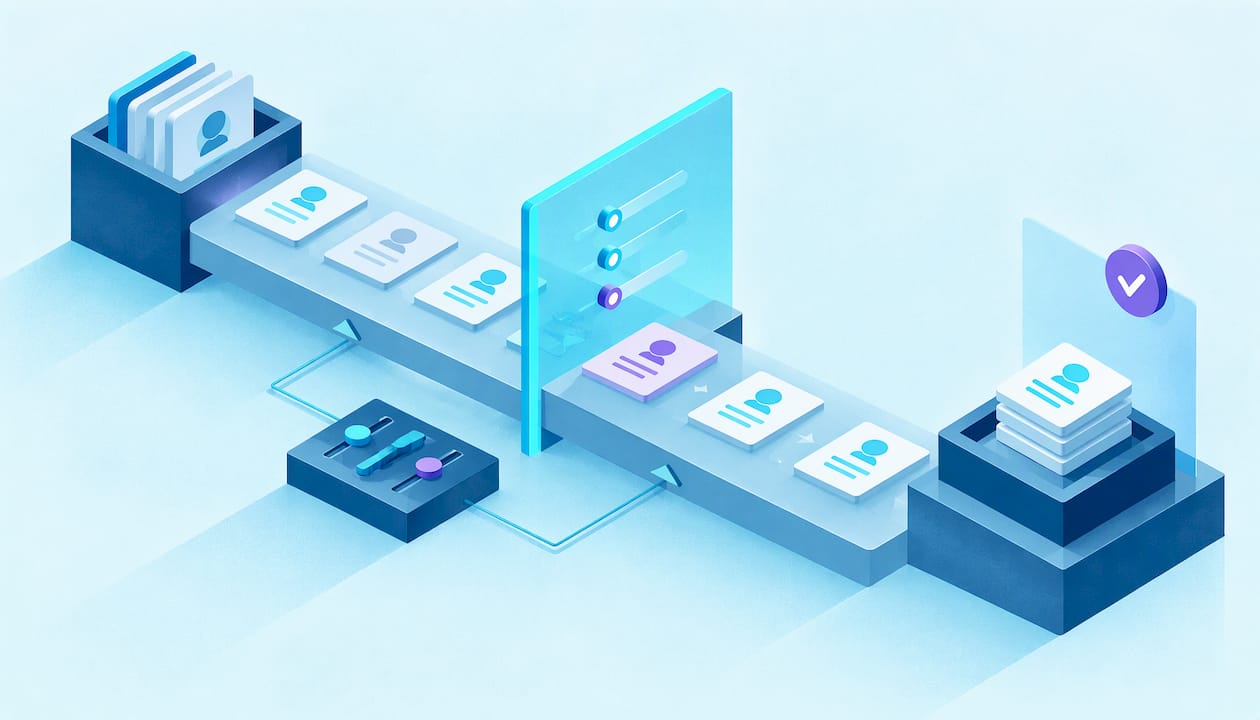
Automated lead qualification is a pipeline of five jobs: capture the lead, enrich the record, score it against your ideal customer profile (ICP), route it to an owner, and log the result in your CRM. A model can do the first four in seconds. You decide the rules and approve anything that leaves your company. That split is the whole design, and it is how you build it in Melaya: bring your own model (Claude, GPT, Gemini, DeepSeek, Mistral, Qwen, Ollama or LM Studio), connect your tools in the Agent Builder, and keep every consequential action behind human approval.
TL;DR
- Write the scoring model on paper first: fit points, behavior points, one sales-qualified threshold, one owner per route.
- Let the agent gather, enrich, score and route. Anything that sends, publishes, pays or writes to a connected app waits for a person to approve it.
- Build the core path first, then add conditions. Run at least five end-to-end tests on real records before go-live.
- Measure time per lead, error rate, automated versus escalated volume and rep adoption every month.
- Melaya works with any cloud or local model, so you can change the model without rebuilding the workflow.
What the workflow actually does
Strip away the vendor language and every automated qualification workflow runs the same five stages.
- Capture. A trigger fires: a form submission, an inbound email, a demo request, a chat transcript.
- Enrich. The agent fills in what the form did not ask for: company size, industry, location, tech stack, the person's role. Sources are your CRM, a company registry, a data provider or the company website.
- Score. Rules turn the record into a number. Fit points describe who the lead is. Behavior points describe what they did.
- Route. The score and attributes decide the destination: an account executive, a nurture sequence, a human review queue, or suppression.
- Record. Every route ends with a CRM record created or updated, so nothing lives only inside the automation.
A language model is useful in stages 2 and 3 where the input is messy: reading a free-text "what are you trying to solve?" field, classifying a reply, summarizing a company website. Arithmetic scoring and routing should stay deterministic. A rule that says "50 or more employees adds 5 points" gives the same answer every time and is easy to audit. A model asked to "rate this lead from 1 to 10" does not.
This matters for the person who owns the pipeline. When a rep asks why a lead landed in their queue, you want to point at a trace, not at a model's mood. In Melaya, runs are traceable and replayable, so you can open a past run and see which tools were called and what each step returned.
Step 1: Write the scoring model before you build anything
Most failed automations fail here, not in the tooling. If your team cannot agree on what a qualified lead is, an agent will simply apply the disagreement faster.
Start from your closed-won deals. Pull the last 20 to 50 and note what they had in common at the moment of first contact: company size, industry, buyer title, how they arrived. Those are your fit criteria. Then list the actions that preceded a booked call: a pricing-page visit, a demo request, a reply to your first email. Those are your behavior criteria.
Here is an illustrative model for a B2B software company. The numbers are an example to adapt, not a benchmark:
| Signal | Type | Points |
|---|---|---|
| Title is Director, VP or C-level | Fit | +8 |
| 50 to 500 employees | Fit | +5 |
| Target industry | Fit | +4 |
| Free email domain (gmail.com, outlook.com) | Fit | -10 |
| Pricing-page visit | Behavior | +6 |
| Demo request | Behavior | +10 |
| Webinar attended | Behavior | +5 |
| Competitor or student email domain | Disqualify | Route to suppress |
Then set the thresholds before the workflow goes live, never after you see the first results:
- 20 or more: sales-qualified. Goes to an account executive.
- 10 to 19: needs review. Goes to a human queue.
- Under 10: nurture. No rep time.
Two cautions on this step. First, if you have little conversion history, start with a hand-set model like the one above and compare it against your own wins, rather than reaching for a predictive model that has nothing to learn from. Second, treat published "AI scoring lifts conversion by X%" figures with care. Most are vendor-supplied and measured on different funnels from yours. Your own win rate by score band is the only number that tells you whether the model works. If you run paid acquisition into this funnel, this guide to lead gen for ecommerce brands shows how conversion data from campaigns can feed the criteria you set.
Step 2: Wire capture and enrichment
Build the core path first: one trigger, one enrichment step, one score, one CRM write. Resist adding conditions until that path runs clean on real records.
In the Melaya Agent Builder you combine a model, tools, memory, triggers and schedules in one visual flow. For this workflow that looks like:
- Trigger: a new form entry or inbound email.
- Enrichment tools: a lookup against your CRM for existing contact history, plus whichever data source you use for firmographics.
- Model step: extract structured fields (role, use case, urgency) from the free-text message into a fixed schema.
- Scoring step: apply the point table.
Where models go wrong in enrichment is predictable. They fill gaps with plausible guesses. Instruct the agent to return "unknown" for any field it cannot source, and make "unknown" a scored state, not a silent zero. A lead with three unknown fields belongs in the review queue, not in nurture.
Because Melaya is bring-your-own-model, you can run extraction on a cheap local model through Ollama or LM Studio when lead data should not leave your infrastructure, and use a larger cloud model only for the steps that need it. Swapping the model does not mean rebuilding the tools or the workflow.
For teams whose leads arrive through a website or portal with no API, Browser Agents let an approved model operate the site directly. That covers the awkward case of copying a lead from one web console into your CRM.
Step 3: Define routing rules and owners
Routing is where qualification becomes revenue, and it is the part teams under-specify. Write each rule as a condition, a destination and a response-time target. Example:
| Condition | Destination | Target |
|---|---|---|
| Score 20+ and demo request | Account executive | Within 1 business hour |
| Score 20+ without demo request | Account executive queue | Same business day |
| Score 10 to 19 | Human review queue | Next business day |
| Score under 10 | Nurture sequence | Automatic |
| Unsubscribe or "remove me" | Suppression list | Automatic, audited weekly |
| Unclear reply | Human queue | Next business day |
Two details save you pain later. Write down one owner per account so that two reps never contact the same company. And make the fallback explicit: what happens when the CRM write fails, the enrichment source times out or the owner is on leave. Every branch needs an end state, and "error notification to a named person" is a valid one.
Step 4: Put approvals where the risk is
Scoring and routing are internal. Sending an email to a prospect, booking a meeting on a rep's calendar, or writing to the CRM is not. Those actions touch customers and your records.
In Melaya, every consequential action (publishing, sending, paying, writing to connected apps) runs behind human approval. For lead qualification that gives you a clean pattern:
- The agent drafts the first-touch reply and attaches the score, the enrichment and the reason for the route.
- A rep sees the draft and the evidence in one place, then approves, edits or rejects.
- Rejections are logged, and you review them weekly to find where the scoring rules are wrong.
This also settles the question of how much to trust the model. You do not have to decide up front. Start with approval on every outbound message. After a few weeks of traces, you will know which low-risk routes, such as moving a clearly unqualified lead into nurture, the team no longer needs to look at, and you can tighten or loosen the permissions granularly from there.
The division of labor is simple. The agent handles high-volume, low-judgment work: gathering data, scoring, routing. People handle conversations, needs assessment and proposals. Pretending a model can do relationship work is how a brand ends up sounding like a template.
Step 5: Test with real records
G2's guide to automating business processes recommends running at least five end-to-end tests with real data and including the people who run the manual process today. Map that to lead qualification:
- Standard lead. Complete record, clean title, obvious fit. Expect the right score and the right owner.
- Missing fields. No company name, no phone. Expect "unknown" values and a review-queue route, not a crash or a guess.
- Unusual format. A message in another language, an all-caps title, a company name with a typo, a pasted signature block.
- Rejection or escalation. A competitor, a student, a job seeker, a refund request sent through the sales form. Expect suppression or a human.
- Error notification. Break the CRM connection on purpose. Expect a message to a named person and no lost lead.
Add a sixth for your own risk: a duplicate submission from an account that already has an owner.
Have the reps who work these leads today review the outputs. They will spot a bad rule in minutes, such as a title list that misses "Head of" roles. When the tests pass, write a one-page reference listing what the automation handles and which steps need a person. Reps read that page before they trust the queue.
Step 6: Measure monthly, tune quarterly
Before go-live, record a baseline: minutes per lead, error rate and the number of leads handled manually. G2's guidance is to track time per instance, exception or error rate, automated versus escalated volume and team adoption on a monthly basis, and to check integration health regularly.
For lead qualification, add three numbers from your own funnel:
- Conversion by score band. Of leads scoring 20 or more, how many became opportunities? Of those scoring 10 to 19? If the bands convert about the same, the points are not predictive and need rework.
- Override rate. How often do reps move a lead to a different route? A rising override rate is the earliest warning that your ICP has drifted.
- Speed to first touch. Time from form submission to an approved reply.
Each quarter, compare the score bands against closed-won and closed-lost deals and adjust the weights. Because runs are replayable, you can re-run a batch of past leads against a revised model before it goes live.
The same pattern for sales, HR and finance workflows
Once the pipeline exists, the shape carries over. Trigger, extract, check against rules, route, approve, record.
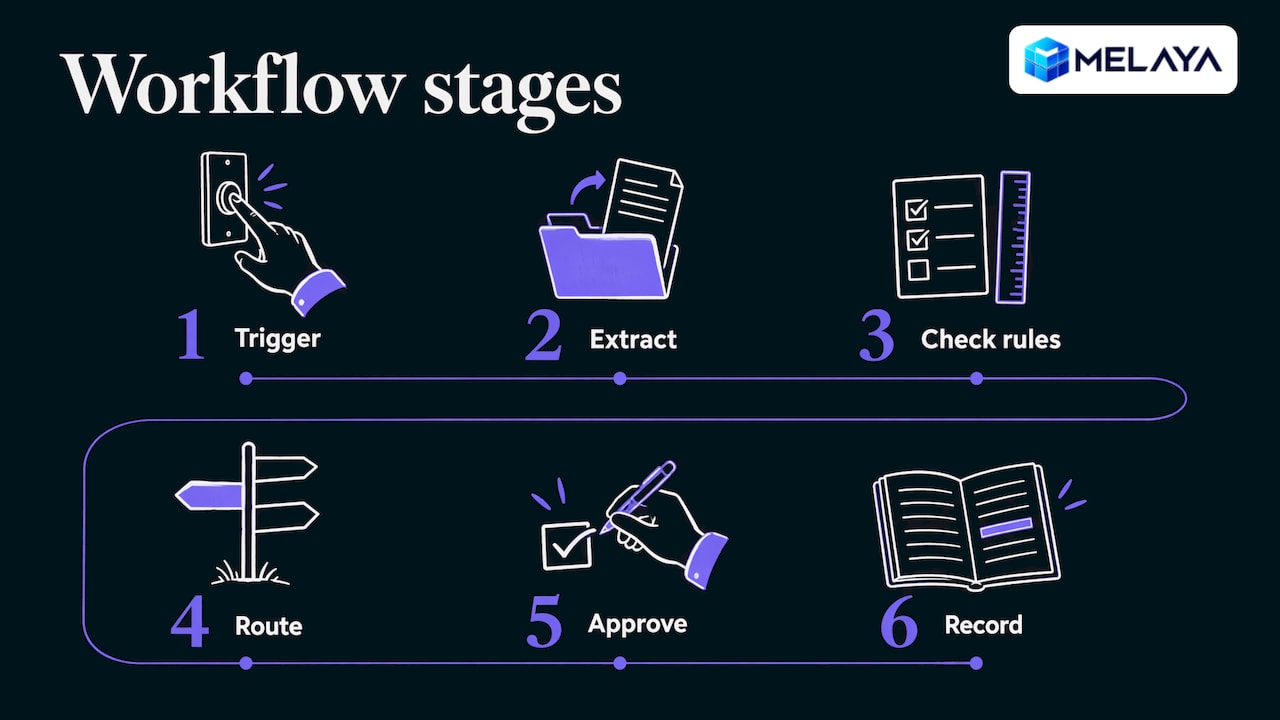
Beyond qualification in sales: the same agent can prepare follow-up drafts, update deal stages and hand a record to the account executive with the context attached. Our sales and business development use case shows how that is organized.
HR workflows: candidate screening, onboarding checklists and leave requests follow the same structure. The difference is the stakes. Decisions about people deserve a person in the approval step every time, and a rule-based score should support a recruiter, never replace one. Check the hiring and privacy rules in your jurisdiction before you automate any screening step.
Finance workflows: invoice intake, matching and coding are a natural fit because the rules are explicit. Payments should always sit behind approval. Our invoice processing build guide walks through that build, and the data entry guide covers the controls for moving records between systems.
Running it on Melaya
Here is the stack for the workflow above, using only components the platform ships:
- Agent Builder for the trigger, tools, memory, schedules, approvals and multi-agent pipelines. You can split the work across agents: one enriches, one scores, one drafts.
- Melaya Assistant to work across your connected business systems.
- Browser Agents for lead sources and consoles that only exist as websites.
- Melaya MCP Server if your team already works in ChatGPT, Claude, Cursor or Codex and wants these tools available there.
- Native integrations with platforms such as Odoo, if that is your CRM or ERP.
The platform is built around granular permissions, human approval controls and execution traces, with independent security audits behind it. For lead data, that means you decide which tools an agent may call and which actions pause for sign-off.
Start building
Melaya Agents is the Agent Builder where this workflow lives. Published plans: Sandbox at $0 per month, Outpost at $20 per month, Forge at $49 per month or $469 per year, Bastion at $129 per month or $1,239 per year, and Citadel from $490 per month. Add-on products are Browser Agents and Mobile Agents at $9.99 per month each, Melaya Assistant at $9.99 per month and Melaya Marketing at $14.99 per month. Compare them on the pricing page, or open the Agent Builder and wire your first capture-to-CRM path.
If the leads you qualify come from SEO and content, Melaya Marketing covers audits, backlink building, analytics and advertising in the same platform.
Perspective
Your AI is the brain. Melaya is the controlled pair of hands. That distinction is why we built qualification workflows around approvals instead of around autonomy.
A model can read a form, pull a company profile and apply a point table faster than any rep. What it should not do alone is email a prospect or write to your CRM. So in Melaya, every consequential action, whether publishing, sending, paying or writing to a connected app, waits for a human to approve it. The agent brings the draft and the evidence. The person makes the call.
We also think the model should be your choice. Melaya is bring-your-own-model: Claude, GPT, Gemini, DeepSeek, Mistral, Qwen, or a local model through Ollama or LM Studio. When a better or cheaper model ships, you change one setting. The tools, permissions, schedules and traces stay where they are. Teams that tie qualification logic to a single provider end up rebuilding it every time the model market moves.
Finally, keep the trace. A score nobody can explain gets ignored by sales within a month. A replayable run, with each tool call and each approval on record, is what turns a lead score from an opinion into something a team can tune.
Melaya Team
FAQ
What does lead automation mean?
It means software handles the repetitive parts of managing leads: capturing them, filling in missing company data, scoring them against your criteria and sending them to the right owner. People keep the judgment calls, such as conversations and proposals. A good setup shows its work, so you can see why each lead went where it did.
Can ChatGPT do lead generation or qualification?
A chat model can summarize a lead or draft a reply, but on its own it has no trigger, no CRM access and no routing. It needs tools around it. The Melaya MCP Server brings Melaya's tools into ChatGPT, Claude, Cursor, Codex and other MCP-compatible clients, so a model you already use can take part in a governed workflow with approvals.
Do I have to use a specific AI model?
No. Melaya is bring-your-own-model and works with cloud and local models, including Claude, GPT, Gemini, DeepSeek, Mistral, Qwen, Ollama and LM Studio. You can change models without rebuilding your tools and workflows.
Should the agent send emails to leads on its own?
No. Sending is a consequential action, and in Melaya it runs behind human approval. The agent prepares the draft with the score and enrichment attached, and a rep approves, edits or rejects it. Over time, the logged approvals show you where the rules are reliable.
How many leads should I test before going live?
Run at least five end-to-end cases on real records: a standard lead, a record with missing fields, an unusual format, a rejection or escalation case and an error-notification case. Add a duplicate-account case for sales routing. Have the reps who qualify leads today review the results.
Sources
- How to Automate Business Processes: 6-Step Guide (G2)
- Lead Gen for Ecommerce: What Works for DTC Brands
Recommended
- AI Sales & BizDev Agents That Qualify, Sell, Retain
- How to Automate Data Entry: Methods, Steps and Controls
- Browser AI Agent Security
Frequently asked questions
What does lead automation mean?
It means software handles the repetitive parts of managing leads: capturing them, filling in missing company data, scoring them against your criteria and sending them to the right owner. People keep the judgment calls, such as conversations and proposals. A good setup shows its work, so you can see why each lead went where it did.
Can ChatGPT do lead generation or qualification?
A chat model can summarize a lead or draft a reply, but on its own it has no trigger, no CRM access and no routing. It needs tools around it. The Melaya MCP Server brings Melaya's tools into ChatGPT, Claude, Cursor, Codex and other MCP-compatible clients, so a model you already use can take part in a governed workflow with approvals.
Do I have to use a specific AI model?
No. Melaya is bring-your-own-model and works with cloud and local models, including Claude, GPT, Gemini, DeepSeek, Mistral, Qwen, Ollama and LM Studio. You can change models without rebuilding your tools and workflows.
Should the agent send emails to leads on its own?
No. Sending is a consequential action, and in Melaya it runs behind human approval. The agent prepares the draft with the score and enrichment attached, and a rep approves, edits or rejects it. Over time, the logged approvals show you where the rules are reliable.
How many leads should I test before going live?
Run at least five end-to-end cases on real records: a standard lead, a record with missing fields, an unusual format, a rejection or escalation case and an error-notification case. Add a duplicate-account case for sales routing. Have the reps who qualify leads today review the results.