How to Manage Marketing Across Channels in 2026
A practical routine for managing marketing across channels: one audience, one data spine, shared naming, approval gates and one ROI question, run by AI agents.

Managing marketing across channels comes down to three things: one audience definition, one data spine, and one measurement frame, with a routine that executes them the same way every week. Most teams already have the channels. What they lack is the layer that moves work between them. In Melaya, that layer is a visual Agent Builder: your AI model (Claude, GPT, Gemini, DeepSeek, Mistral, Qwen, or a local model through Ollama or LM Studio) is the brain, and Melaya is the controlled pair of hands that runs audits, reports, and campaign tasks across your tools, with a human approving every consequential action.
This guide is for builders and operators: founders, marketing ops, developers wiring AI into a stack, and teams that want provider-independent automation. It gives you the routine step by step, with the points where each step usually breaks.
TL;DR
- Cross-channel means channels share data and inform each other. Running several channels independently is multichannel, and it is what most teams actually do.
- The work is mostly a data job: one audience definition, one naming convention, one ROI question across every channel.
- Run the routine in six steps: journey map, channel roles, data spine, orchestration rules, approval gates, measurement.
- In Melaya, you bring your own model, schedule and trigger agent runs, and every publish, send, pay, or write to a connected app waits for your approval.
- Melaya Marketing is $14.99 per month; Sandbox is $0 per month for building your first workflow.
What managing marketing across channels actually means
Three terms get mixed up. A peer-reviewed article in Electronic Markets describes multichannel businesses as firms offering two or more channels that are treated as independent silos and optimized separately. Cross-channel is the intermediate state, where a customer can switch between some, but not all, channels. Omnichannel goes further and requires integrated information systems, channel management, incentive schemes, and logistics.
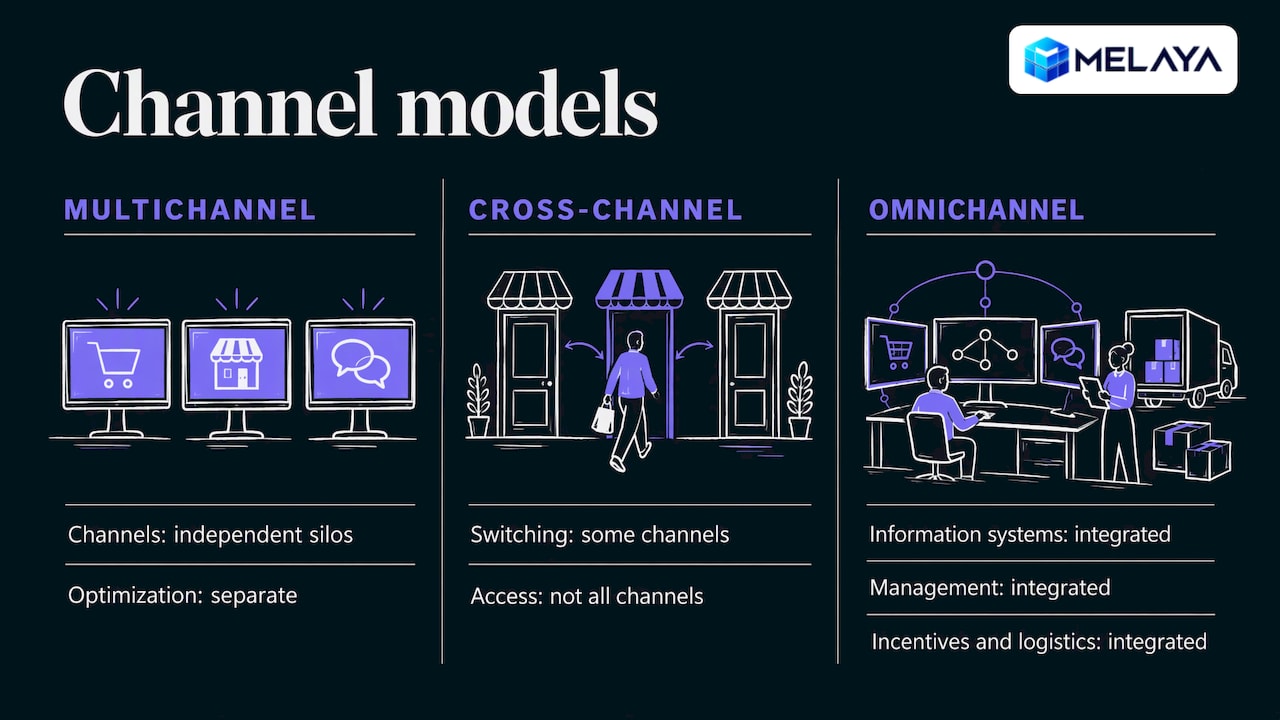
For a marketing team, the practical test is simple. If your email platform does not know that a prospect just clicked a paid ad, and your paid campaigns keep retargeting someone who already bought, you run multichannel. If each channel's data changes what the others send and when, you manage across channels.
The gap is mostly not strategy. It is plumbing. The 2025 State of Martech report from LXA Hub found the average enterprise marketing stack at 62 tools, up from 56 in 2023, and 61% of organizations struggling to use their data effectively. A Telia martech lead quoted in the same report called a stack without orchestration "well-funded chaos". More tools did not produce coordination. Something has to connect them.
The six-step routine
1. Map the journey before you pick channels
Start from the customer's path, not from the channel list. For each segment, write down the entry points, the decision steps, and where people drop off. A SaaS example: a visitor reads a blog post (organic search), views pricing twice (site analytics), gets no reply to a form (CRM), and sees a retargeting ad (paid). Four systems, one person.
Where it goes wrong: teams map channels ("we do email, social, and ads") instead of paths, so every channel optimizes its own click metric.
What to do with agents: a scheduled Melaya agent can pull the same report from each connected system on a cadence and write the journey summary for you to review. The output is a document, so nothing is published or sent.
2. Give each channel one job
Assign roles by journey stage rather than running every channel for every purpose. A workable split:
| Stage | Typical channels | Job |
|---|---|---|
| Awareness | Organic search, social, display | Be found, introduce the problem |
| Consideration | Email, retargeting, webinars | Educate, show proof |
| Decision | Sales calls, live chat, SMS | Remove the last objection |
| Retention | Email, SMS, in-app, loyalty | Onboard, expand, renew |
The roles are what keep messaging consistent. Social carries the announcement, email assumes the reader already saw it, search defends the branded query, and display retargets visitors. Same campaign, four different sentences, none of them repeated.
Where it goes wrong: copying one creative asset into every channel. Keep one message and one offer, then render it natively for each format.
3. Build one data spine and one naming convention
This is the step that decides whether the rest works. A data spine is a single place where audience lists, campaign names, and conversion events agree. At a minimum:
- One audience definition (for example, "visited pricing in the last 14 days, no trial started") that you push to every platform.
- One campaign naming pattern used in ad platforms, email, analytics, and CRM, such as
2026-q4_launch_paid-social_us. - One conversion definition, counted once. If you add up each platform's self-reported conversions, the total will exceed what the business actually closed.
The shared data foundation across your martech tools is also a CRM and lead-management problem; this guide on building a shared data foundation covers how service businesses set it up.
Where it goes wrong: naming drift. "Black-Friday", "BF2026", and "bf_sale" become three campaigns in reporting. A Melaya agent can audit names across connected systems on a schedule and list mismatches for you to fix, which is a read-only task that needs no approval.
4. Set orchestration rules
Orchestration is the rule set that decides who gets which message, over which channel, and when. Keep it short and explicit:
- Triggers over calendars. Fire on behavior: pricing page viewed, trial stalled, invoice paid.
- Frequency caps. Set a maximum number of touches per person per week across all channels combined, not per channel.
- Priority. Onboarding and renewal-save journeys outrank generic nurture. Pause lower-value programs when someone enters a higher-value sequence.
- Suppression. Remove buyers from acquisition ads, and remove open opportunities from cold outreach.
In Melaya's Agent Builder, triggers, schedules, memory, and multi-agent pipelines are first-class parts of a workflow, so the rules above become nodes you can read rather than logic scattered across five tools. Our deeper write-up on AI orchestration covers how to structure these pipelines.
5. Put approval gates on everything consequential
Automation across channels multiplies the cost of one bad run. A wrong subject line sent to a full list, or a budget change pushed to every ad account, happens everywhere at once.
In Melaya, every consequential action, meaning publishing, sending, paying, or writing to a connected app, runs behind human approval. Agents draft, prepare, and queue. You approve. Each run is traceable and replayable, so when a number looks off you can open the execution trace and see which step produced it. Granular permissions let you limit which systems an agent can even touch.
A practical gate list:
- No approval needed: audits, reports, reading analytics, drafting copy.
- Approval required: publishing a post, sending an email, changing ad spend, updating CRM records.
The AI social media manager use case shows this split for posting and replying across social accounts.
6. Measure one ROI question across all channels
The measurement side is well documented. The IAB's cross-channel measurement playbook (November 2024) lays out eight implementation steps:
- Define objectives and KPIs.
- Audit team and technical capabilities.
- Build a unified data strategy, including warehouse or lake, ETL automation, and data governance.
- Select and test attribution models: single-touch, multi-touch, data-driven.
- Deploy dashboards and automated reporting.
- Ensure privacy compliance, including consent management.
- Analyze data for gaps and anomalies.
- Run quality-assurance audits.
Steps 5 and 7 are where automation pays back fastest. A weekly agent run can assemble the report, flag anomalies against last week, and hand you a summary to read on Monday. Our marketing reporting automation build guide walks through the setup.
Where it goes wrong: reporting each channel's own dashboard side by side. Pick one question (for example, cost per qualified pipeline dollar) and answer it from the shared data, not from the platforms' own attribution.
Where the work lands in Melaya
Here is how the routine maps to what Melaya offers.
| Routine step | Melaya piece | Price (per the pricing page) |
|---|---|---|
| SEO, backlinks, ads, analytics | Melaya Marketing | $14.99 per month |
| Operating web dashboards and ad consoles | Browser Agents | $9.99 per month |
| Working across connected business systems | Melaya Assistant | $9.99 per month |
| Android apps | Mobile Agents (Android only) | $9.99 per month |
| Building and testing workflows | Sandbox | $0 per month |
| Full workflow builds | Outpost | $20 per month |
Teams that need more capacity can look at Forge ($49 per month or $469 per year), Bastion ($129 per month or $1,239 per year), or Citadel (from $490 per month) on the pricing page.
Two design choices matter for builders. First, Melaya is bring-your-own-model: it works with any cloud or local model, and you can switch models without rebuilding your tools and workflows. Second, the Melaya MCP Server brings these capabilities into clients you already use, such as ChatGPT, Claude, Cursor, and Codex, so a marketer can ask for an audit from the chat window they already have open.
For SEO specifically, the split between what to automate and what to approve is laid out in our SEO automation guide.
A worked example: one launch, four channels
Suppose you launch a product update with a $4,000 budget over three weeks.
- Monday, week 0: an agent audits last quarter's campaign names across your analytics and ad accounts and lists inconsistencies. You fix the naming pattern.
- Define the audience: "visited pricing in the last 14 days, no trial started." The same definition goes to paid social, email, and retargeting.
- Draft: the agent drafts the announcement post, the email, and two search ad variants from one brief. You review all four.
- Approve and queue: you approve each publish and send action. Nothing leaves without that click.
- Weekly: a scheduled run compiles spend, clicks, trials started, and pipeline created into one table, and flags any channel where cost per trial rose more than a threshold you set.
- Adjust: you decide on the budget shift, then approve the change.
Every step produces a trace you can replay. If the week-two report looks wrong, you open the run and read which source returned what.
Perspective
Cross-channel marketing looks like a strategy problem and behaves like an execution problem. Teams know what they want: the same audience, the same message, one number for ROI. They lose it in the handoffs between tools, where someone copies a list, renames a campaign, or pastes a figure into a slide.
We built Melaya on a simple idea: your AI is the brain, Melaya is the controlled pair of hands. The model you choose, cloud or local, decides what to do. Melaya gives it tools, memory, schedules, and triggers, and keeps every run traceable and replayable. Granular permissions define what an agent can reach, and human approval stands in front of every publish, send, payment, or write to a connected app.
That combination is what makes cross-channel work practical. You get the speed of automation on the repetitive parts, audits, reporting, drafting, and you keep the decisions. And because you are never tied to one model provider, the workflow you build this quarter still runs when you change models next quarter.
Melaya Team
Run it with Melaya Marketing
If you want the routine above running on a schedule, Melaya Marketing covers AI-powered SEO audits, backlink building, advertising, analytics, and marketing automation, at $14.99 per month. Start in the $0 Sandbox to build the workflow, then move it to a paid plan when it is ready. See all plans on the pricing page.

You can see how teams structure agent crews for campaigns in our marketing automation use cases.
FAQ
What is the difference between cross-channel and multichannel marketing?
Multichannel runs several channels independently, each with its own campaigns and data. Cross-channel coordinates them through shared data, so what happens in one channel changes what the others do. Omnichannel goes further, with integrated systems that let customers move between channels without friction.
How many channels should I manage at once?
Only as many as you can give a clear job and measure. Choose channels from behavioral data about where your customers are active, not from industry averages. Two or three well-coordinated channels with shared data beat six that run separately.
Can AI agents run my campaigns without supervision?
Not the consequential parts. In Melaya, publishing, sending, paying, and writing to connected apps all run behind human approval. Agents handle the preparation: audits, drafts, reports, and queued actions that you review and approve.
Do I need a specific AI model to use Melaya for marketing?
No. Melaya is bring-your-own-model and works with any cloud or local model, including Claude, GPT, Gemini, DeepSeek, Mistral, Qwen, Ollama, and LM Studio. Melaya does not sell or require its own model for agents.
Sources
- Omnichannel Business, Electronic Markets (Springer Nature)
- The State of Martech & Marketing Operations Report 2025 (LXA Hub)
- Implementing Cross-Channel Measurement for Marketers Playbook (IAB, November 2024)
Recommended
Frequently asked questions
What is the difference between cross-channel and multichannel marketing?
Multichannel runs several channels independently, each with its own campaigns and data. Cross-channel coordinates them through shared data, so what happens in one channel changes what the others do. Omnichannel goes further, with integrated systems that let customers move between channels without friction.
How many channels should I manage at once?
Only as many as you can give a clear job and measure. Choose channels from behavioral data about where your customers are active, not from industry averages. Two or three well-coordinated channels with shared data beat six that run separately.
Can AI agents run my campaigns without supervision?
Not the consequential parts. In Melaya, publishing, sending, paying, and writing to connected apps all run behind human approval. Agents handle the preparation: audits, drafts, reports, and queued actions that you review and approve.
Do I need a specific AI model to use Melaya for marketing?
No. Melaya is bring-your-own-model and works with any cloud or local model, including Claude, GPT, Gemini, DeepSeek, Mistral, Qwen, Ollama, and LM Studio. Melaya does not sell or require its own model for agents.