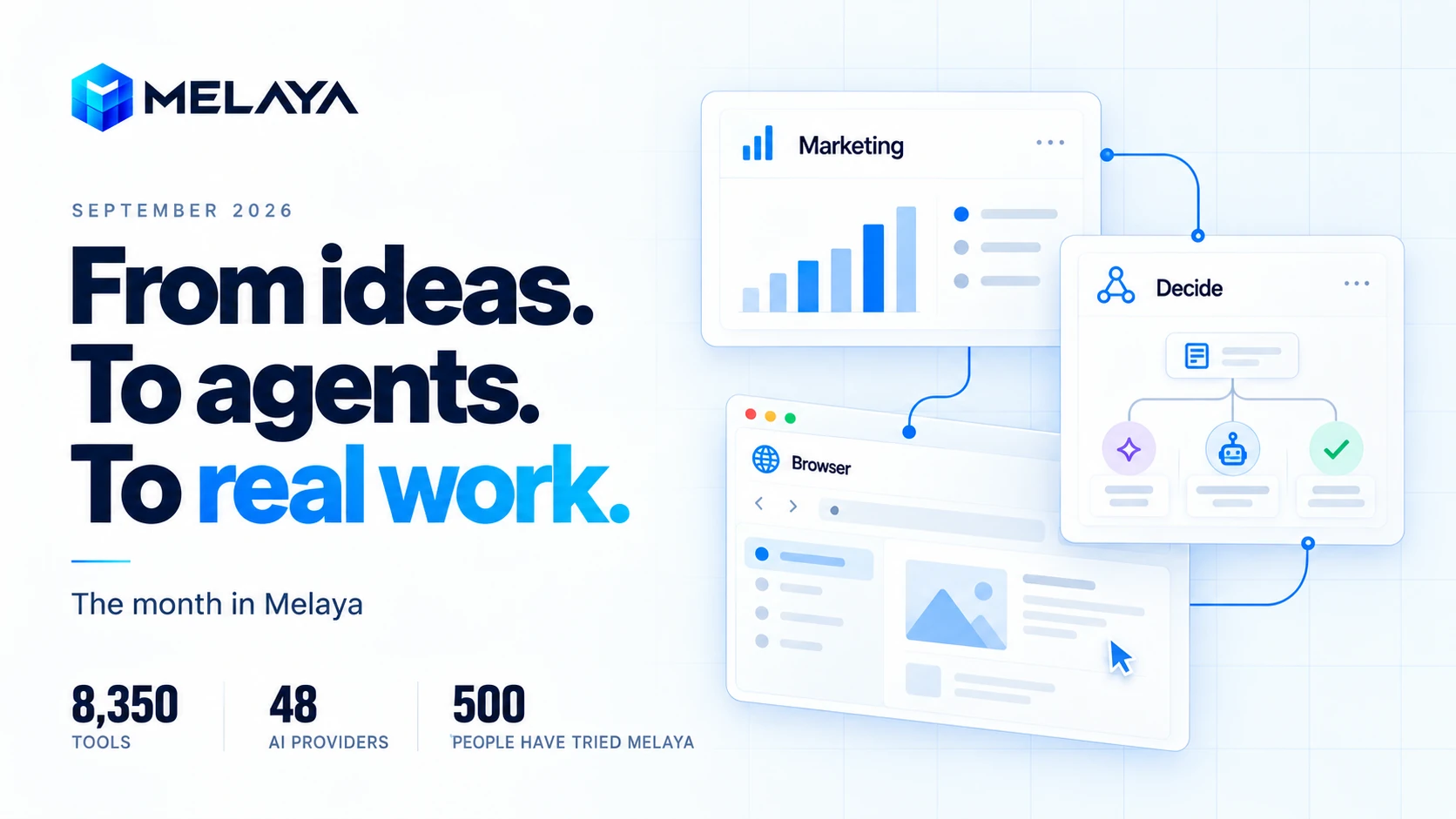
September was the month Melaya started doing more of its own work. The same agents we build for other people began researching opportunities, preparing release notes, maintaining community activity, and reporting on the business. That made every missing permission, slow editor, and unreliable tool much harder to ignore.
In August, agents entered the browser and Melaya reached its first 100 users. September connected those capabilities to a bigger question: can a small team turn the work around a business into repeatable, understandable workflows?
A founder does not wake up wanting another agent framework. They want to know why their website is not being found, which campaign needs attention, what to publish, which opportunities deserve a reply, and whether yesterday's automation actually finished.
September brought those jobs closer together. We introduced the Marketing workspace, expanded browser and MCP workflows, added models that make structured decisions, and built an event layer for starting work when something happens. Melaya also completed CASA AL1 with TAC Security, received Google OAuth app approval, and ran a full authorization test across its API. The catalog reached 8,350 tools and 48 AI providers. We also crossed 500 people who have tried Melaya.
This recap covers the September work recorded through September 30: 358 commits, compared with 247 in August. It combines that development history with product documentation and checks of the workflows we run for Melaya. Screenshots are captures from the month; the numbers inside them are not month-end performance reports.
AI agents for business: September 2026 at a glance
| Area | What changed | What that means in ordinary work |
|---|---|---|
| Marketing | SEO audits, advertising insights, guided quests, backlinks, social publishing, and an Assistant | Find a problem, understand it, and start a relevant task from the same workspace |
| Security and compliance | CASA AL1 completed with TAC Security, Google OAuth app approval, a full-API authorization test, and OWASP-guided hardening | Connect Google accounts through an approved app, with tenant boundaries and approval gates tested |
| Browser, MCP, and the Melaya skill | Reusable tab permissions, better uploads, cloud pipeline access to the extension, and a published skill that teaches AI assistants to build on Melaya | Ask Claude, Claude Code, or Codex for a complete workflow in plain words, without learning the interface |
| System One | Jev and Laya decision tools, batch scoring, and a visual Decide step | Classify, score, or route information without asking a chat model to write an essay |
| Event triggers | Webhooks, streams, polling, decision filters, and delivery history | Define what should start a workflow and inspect why it did or did not run |
| Models and connectors | More hosted and local choices, native search, OAuth improvements, and public research tools | Choose the model and account that fit each stage of the job |
| Agent Builder | Clearer parallel steps, faster editing, grouped tools, and more useful monitoring | Build and maintain larger workflows without losing the thread |
| Operations and recovery | More precise approvals, clearer stop feedback, recovery cards, and usage accounting | Keep consequential actions understandable and recover when something goes wrong |
| Affiliate program | A dedicated Affonso-powered portal for people recommending Melaya | Get a referral link and track eligible commissions |
| Community and partnerships | 500 users, Writingmate, Flowlines, Databricks connected partner, and more guides | Make the product easier to adopt, explain, and operate |
Some capabilities remain in Labs or beta, and individual connectors still depend on account permissions, provider terms, and plan access. This is a record of what September added and improved, with those boundaries kept visible.
AI affiliate program: earn by recommending Melaya
If you already help people choose software, build automations, or put AI to work, you can turn those recommendations into an income opportunity with Melaya's affiliate program, powered by Affonso.
The program is for creators sharing practical workflows, consultants recommending tools to clients, and builders helping teams get started with agents. Show someone a useful outcome: a website audit they can act on, a browser task they can supervise, or a recurring workflow that fits their business. When your recommendation leads to an eligible referral, you can earn a commission under the program's terms.
Affonso provides the affiliate portal for referral links, attribution, commission tracking, and payout information. September work also brought the affiliate experience into Melaya accounts, with membership, tier, and coupon handling connected to the program.
Getting started is straightforward:
- Join the program at melaya.affonso.io and review the current terms.
- Use your referral link when sharing Melaya with your audience, clients, or community.
- Track your referrals and eligible commissions in the affiliate portal.
Choose a use case you understand and show how it works. A concrete walkthrough gives people a better reason to try Melaya than a generic recommendation.
1. AI marketing workspace: from SEO audit to action in one place
Marketing tools often stop at a chart. The next part still belongs to a person: work out what changed, choose a response, open another application, and carry the context across.
Melaya's new Marketing workspace connects six surfaces: SEO Audit, Overview, Quests, Backlinks, Socials, and Assistant. Each answers a different question, but they share the business context and connected tools needed to move forward.
SEO audits begin with the website and its evidence
The SEO audit examines the site before asking specialists to interpret it. Technical structure, content quality, structured data, links, images, international targeting, and visibility to AI search systems all contribute to the picture. PageSpeed and Core Web Vitals provide a separate view of the visitor's experience.
That distinction matters. A slow page, an unclear product description, and an incorrect canonical URL are three different problems. They should lead to three different recommendations.
The audit also became easier to follow while it runs. Specialist progress stays visible, completed work survives navigation between tabs, and a failed source is identified as failed rather than quietly presented as a completed check. A partial report can still be useful when it says which evidence is missing.
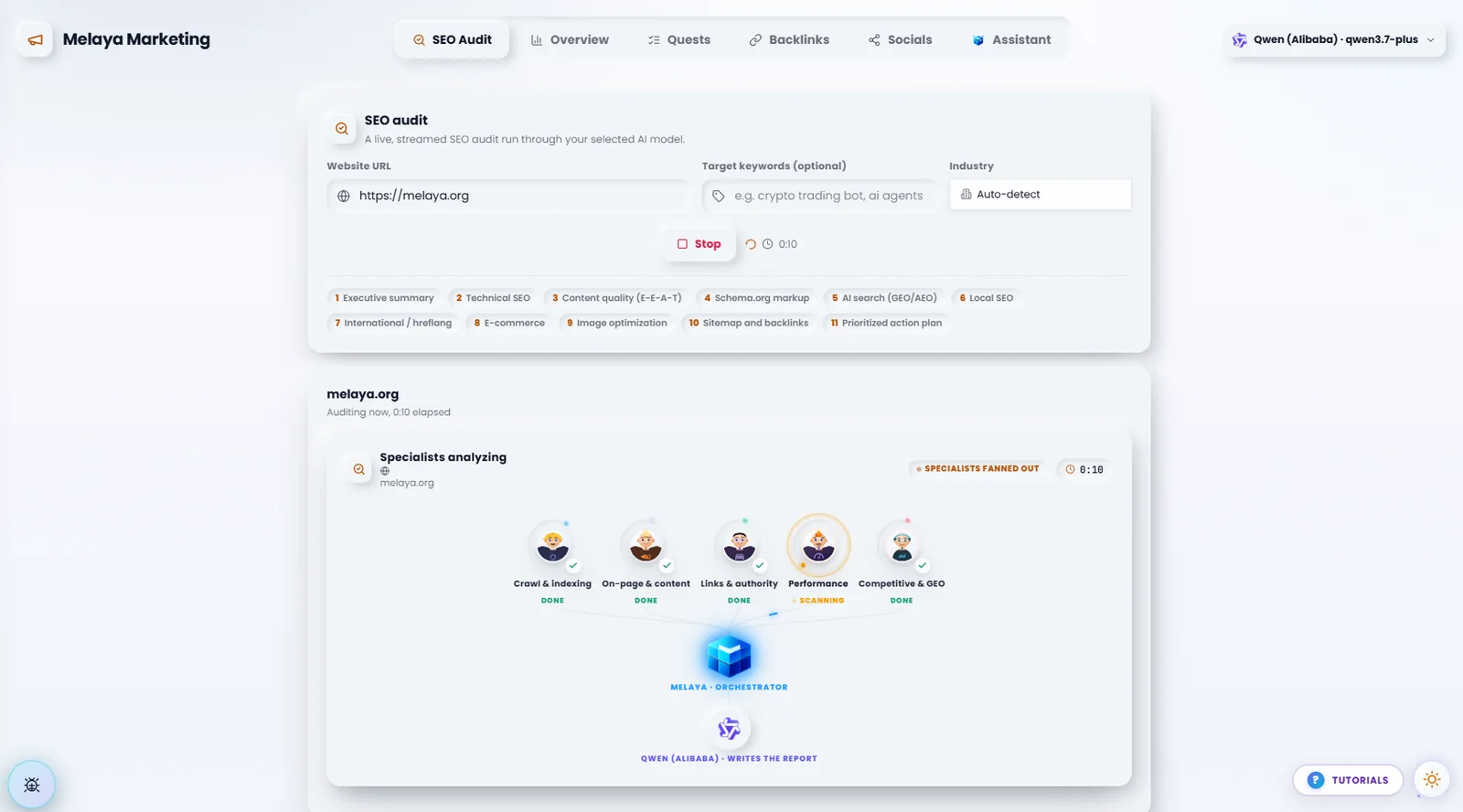
A website audit becomes more useful when the recommendation is connected to the evidence. Melaya separates the checks, shows progress, and lets the user continue with a focused task.
Search performance also became more informative. Connected webmaster accounts can show impressions, clicks, average position, queries, and pages. Starting with impressions helps a new site understand whether it is being seen at all, even before it earns many clicks.
Advertising advice follows the accounts you actually connected
The advertising surface brings together supported Google, Meta, TikTok, Reddit, Microsoft, and Amazon Ads data. September work tightened reporting dates, account selection, currency presentation, campaign actions, and the tools available to the marketing agents.
One small prerequisite bug exposed a larger design rule: a cross-platform task must not disappear just because the user has not connected Google Ads. Someone using only Meta or TikTok should still see the relevant entry point.
Quests turn a finding into a manageable next job. Instead of receiving a vague instruction to improve marketing, a user can start an applicable campaign, analytics, search, or website task with its required tools and business context already attached.
Those tasks open in a conversation panel. The Assistant explains what it found, returns files where relevant, and presents pending approvals after its response. Rejection can include a reason, so the next attempt has something useful to learn from. An approval is part of the conversation, not an isolated yes-or-no obstacle.
2. Automated backlink building: research, verify and submit to 886 directories
Finding places to list a business sounds simple until you try it across hundreds of sites. Some charge for a website link. Some stopped accepting submissions. Some already have your listing under a different name. Some return a person with a similar name and make it look like your company was found.
September turned that problem into a dedicated Backlinks workspace. The audited catalog contains 886 entries, spanning software, AI, business directories, communities, marketplaces, and other relevant destinations. That is a catalog of opportunities and their known states, not a promise of 886 free or available backlinks.
The setup saves the website, business description, brand aliases, categories, logo, browser selection, and autonomy preference. Categories narrow the directories shown and checked. The interface adds filters, pagination, clearer listed states, and access to the discovered URL so the user can confirm that a result really belongs to the business.
Finding a name is not enough
A useful presence check needs to answer two questions separately:
- Is this actually the business's listing?
- Does that listing link to the business's website?
A search result for a person named Melayah is not evidence that Melaya is listed. Equally, a Firefox listing linking to a product page on melaya.org should not be marked as missing its website link just because the URL is not the homepage.
September fixes tightened identity matching, recognized deeper website links and encoded outbound redirects, and improved directory-specific discovery for destinations including Product Hunt, the Chrome Web Store, Firefox Add-ons, Notion, and npm. The npm path can inspect a package's homepage and README links; it does not require the user to provide a listing URL first.
The checking system uses bounded fetches, caching, and escalation to more capable retrieval paths where needed. A JavaScript-only page or an anti-bot challenge must remain an uncertain result until there is enough evidence. A blocked request is not proof that a listing does not exist.
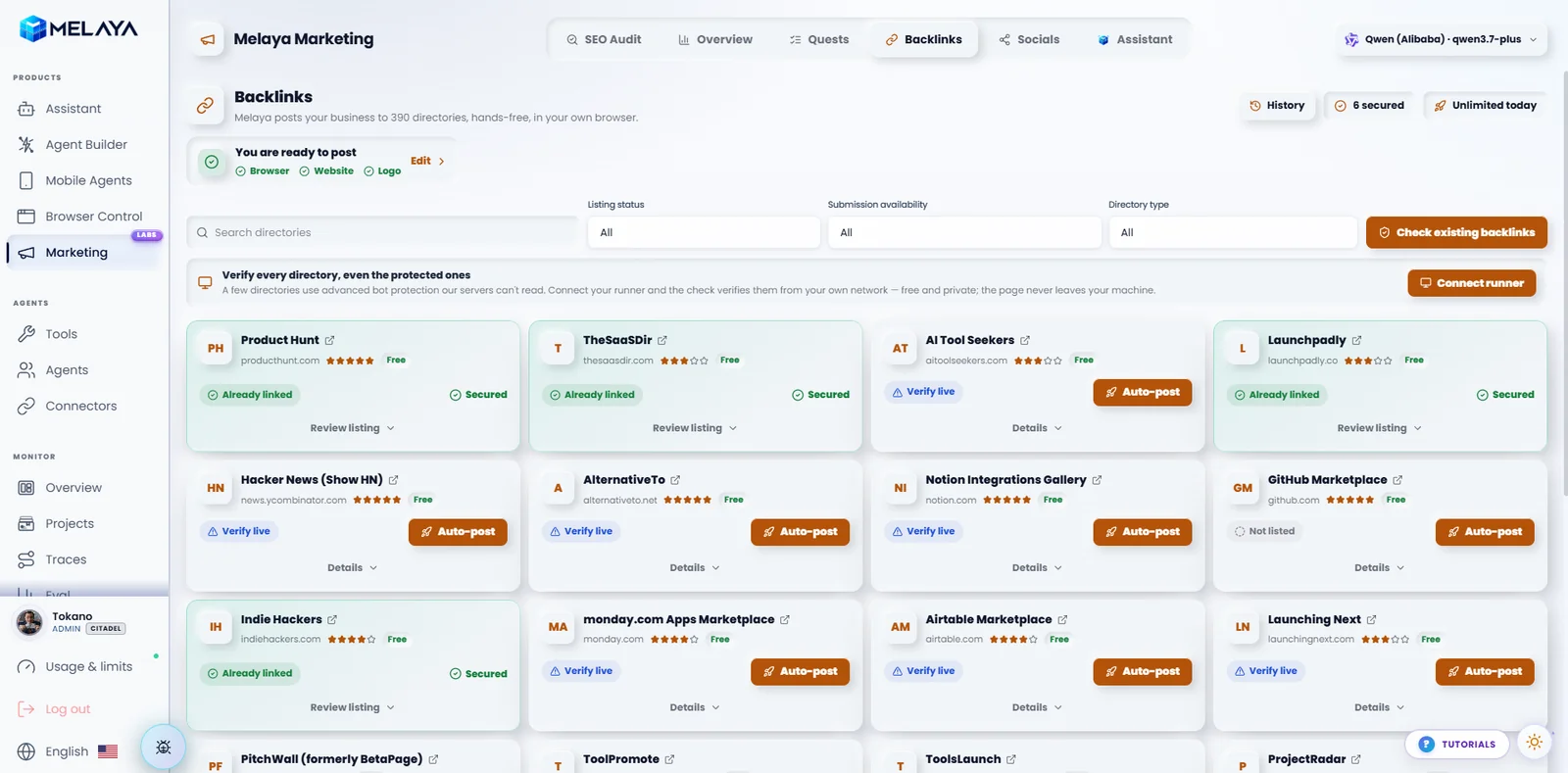
Presence, website-link detection, and submission availability are different states. Keeping them separate helps users avoid duplicate submissions and destinations that no longer accept a free listing.
Availability belongs in the interface
Directory entries can expose submission conditions and availability, including paid links, closed submissions, discontinued or unreachable sites, and cases that still need verification. Evidence dates and source links make those states more useful than a permanent green badge.
The saved setup and latest results are stored per user and website, with tenant controls and indexed database access. Refreshing the page should not mean starting the research again. Website allowances are enforced on the server; removing a profile does not reset a plan's allotted website mappings.
When it is time to submit, Melaya can work through the user's paired browser, opening a separate tab for a directory while preserving the Melaya page. The extension's upload path can resize or convert a prepared logo to a required format. Account creation, human verification, and publishing remain subject to the task's instructions and approval policy.
The result is a more useful goal than maximizing a directory count: find a relevant destination, verify its conditions, avoid duplicates, and complete a reviewable submission. No directory listing guarantees rankings, traffic, or a dofollow link.
3. AI social media publishing with brand voice and human review
The Socials workspace brings connected accounts, account or company selection, audience information, content preparation, and publishing actions into one place.
Account selection is a real boundary. Posting as a person and posting as a company are different tasks. September work improved entity switching, platform-specific brand voices, available metrics, and the way missing data is represented. An unavailable metric should stay unavailable, rather than being replaced with a convincing-looking number.
The creative side expanded too: Canva integration, image downloading, meme generation, media attachments, Discord file delivery, Telegram stories, and fixes to image and video publishing paths. TikTok work added a dedicated review experience around the content and publishing choices.
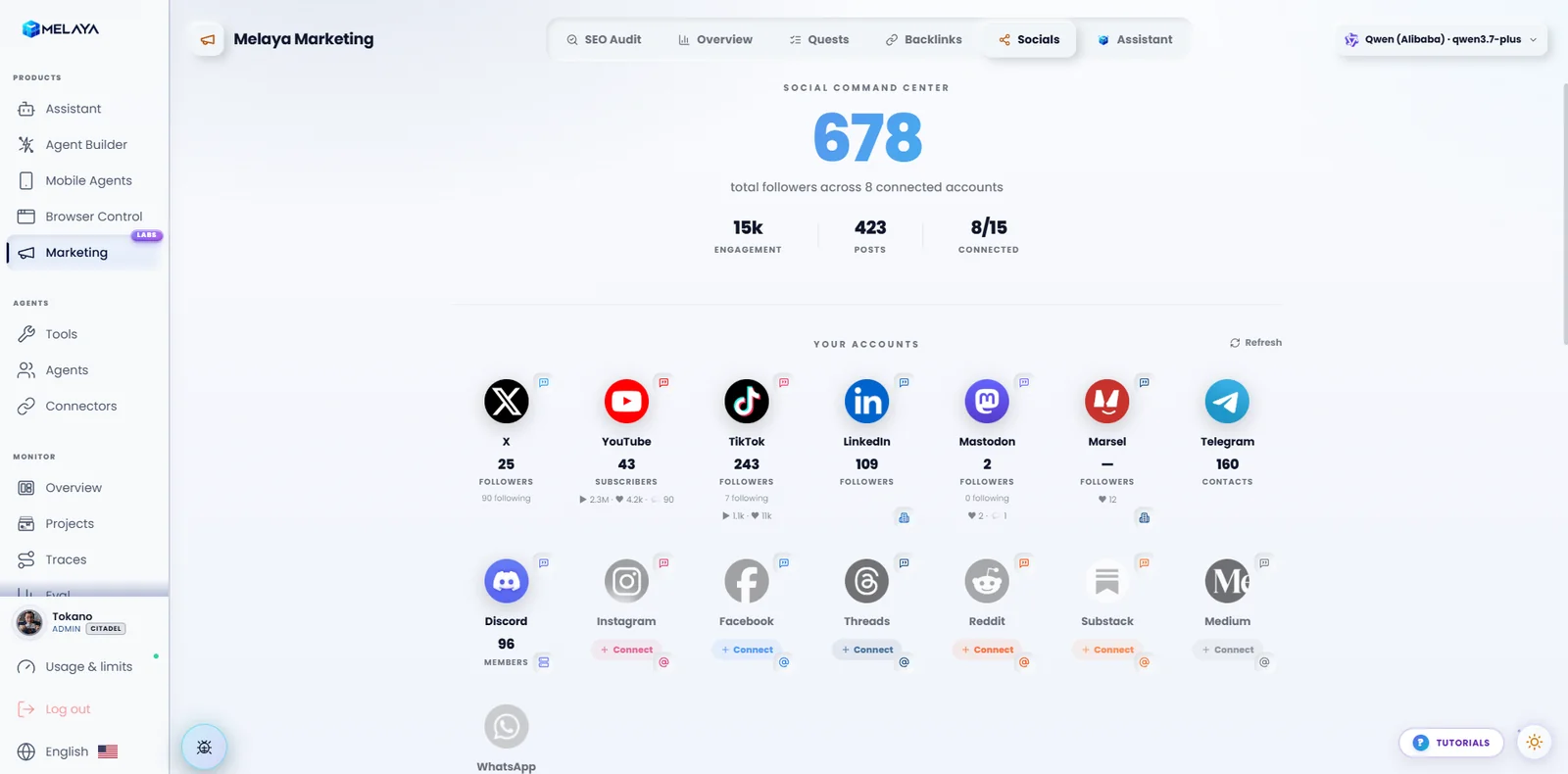
Prepare content around the selected account and platform, inspect the assets, and choose whether to keep a draft or proceed through the available publishing route.
Underneath, different platforms still require different mechanisms. A supported API, a browser session, and an Android app are not interchangeable. The workflow must use the route available for that account and respect its permissions and limits.
That is also why draft creation and publishing are distinct choices. Generating a good caption is useful; sending it to the correct audience under the correct identity is the consequential part.
4. MCP server and AI browser agents: build agentic systems from Claude, Claude Code or Codex
August introduced the browser surfaces. September concentrated on making them hold up across repeated work.
The Melaya MCP server gives compatible AI clients a permissioned route into Melaya. An external assistant can inspect workflows, use exposed tools, review runs, and work with paired browsers or devices within its authorized scope. The September 29 catalog records 88 MCP tools.
The important detail is whose environment the assistant is using. A browser extension connects to the person's actual browser and signed-in pages. It does not make every tab automatically available to every assistant.
Tab permissions should survive a normal workflow
The attach flow became more explicit about granting the current tab or allowing work across tabs. A still-valid grant can be reused, rather than forcing the user through a stop-and-attach cycle. An unacknowledged request is no longer treated as a successful attachment.
Multi-browser selection, clearer connection labels, tab search by title or URL, and instructions to open a new tab for a new task all reduce accidental disruption. A directory submission should not replace the page where the user is supervising the work.
The underlying actions improved as well: hover, native select controls, iframe handling, more stable targets, and access to browser console, network, and performance diagnostics. Upload fixes covered local MCP files, writable staging paths, and choosing the correct file input inside a composer dialog.
Cloud execution can reach an authorized local browser
Late September added an extension transport for saved pipelines running in the cloud. That allows a cloud workflow to drive a paired browser extension without requiring a separate local runner solely for that browser connection.
The browser still needs to be online, connected, and authorized. Local inference and dedicated runner-managed browser sessions remain separate choices.
The model decides which AI answers. The execution environment decides where the workflow runs. The browser grant decides which browser and tabs it may operate. September work made these boundaries easier to preserve across the Assistant, MCP clients, and saved pipelines.
Browser autonomy also became more consistent across entry points, reducing repeated approval cards for an already-authorized policy while preserving the checks required by that policy. MCP usage has its own accounting, so external tool calls can be understood separately from a chat conversation's usage.
Extension packaging expanded with a dedicated Opera build alongside the existing browser packages. Packaging support and individual extension-store publication are separate milestones.
Build complete agentic systems without learning the interface
The MCP server gives an AI assistant access to Melaya. On September 26 we published the Melaya skill, which teaches that assistant how to use it well.
The skill is a set of instructions that assistants such as Claude, Claude Code, and Codex load when you ask them to work with Melaya. With the MCP server connected, you can describe what you need in plain words, and the assistant does the platform work: it finds the right tools and connectors, writes the pipeline, previews and validates it, runs it, checks the real output, schedules it, and documents it.
That changes who can build on Melaya. You no longer need to understand the canvas, step types, or connector settings to get a working system. Someone who has never opened the Agent Builder can ask for "a weekly report from my Stripe and Google Analytics data, saved to a Google Doc, with my approval before it is emailed" and end up with a saved, scheduled pipeline they can inspect in the app.
The skill covers two journeys:
- People who want results: run a template, start a run with a brief and files, watch it, schedule it, and adjust it, all from the conversation.
- Builders and integrators: go from a client's requirements to a complete multi-pipeline system, phase by phase, including shared Google Sheets as the system's database, event triggers, validation, and plain-language handover documentation.
The skill also sets guardrails the assistant must follow. It never approves, rejects, or edits an approval on your behalf; it confirms before anything that sends, posts, or deletes; it never asks for passwords or keys in the chat; and it judges a run by its real output, not by a green status. Anything that moves money stays an approval in the Melaya app.
5. AI decision engine: Jev and Laya classify, score and route without an LLM essay
Many tasks do not need a paragraph. They need an answer such as “support,” “sales,” or “other”; a relevance score; or a yes-or-no decision about whether the next step should run.
September introduced System One decision models through two routes: Jev, the hosted engine from TypeSafe, and Laya, an open-weight engine that Melaya can run locally on CPU.
Think of a decision step as the person sorting incoming mail before the specialist opens it. The sorter is given a defined question and allowed answers. The specialist only receives the items that need their attention.
A decision is a tool result, not a miniature essay
Decision tools return structured choices, scores, or boolean answers. They can be called from an agent, used in batches, or placed directly on the canvas as a Decide step. The visual setup asks three plain questions: what should be asked, when should the pipeline continue, and who should answer?
The direct step avoids an extra chat-model exchange just to invoke the decision. Batch paths can score records from a file without asking an LLM to copy identifiers and data into a fresh list first. That reduces a common source of corrupted rows and mismatched results.
September also tightened question normalization, confidence handling, and the inputs passed into these models. Routing can use calibrated answer confidence, rather than assuming every returned choice is equally reliable.
- A new item arrivesAn email, document, lead, or application event
- Ask a bounded questionChoose a category, return a score, or answer yes/no
- Check the answer and confidenceContinue, stop, or send the uncertain case for review
- Use the right workflowBring in a specialist only when the task needs one
“Zero generated output tokens” describes how a decision engine returns its result. It does not mean every decision is free, instantaneous, or correct. Jev has its own hosted terms; local Laya uses compute and is subject to Melaya's limits. Confidence helps route uncertainty, but it does not replace validation on the task being automated.
Laya is an upstream open-weight model integrated into Melaya, not a model we claim to have trained from scratch. The aim is practical: use a suitable decision mechanism for a bounded question and reserve the larger model for the work that needs it.
6. Event-driven AI workflows: webhooks and app triggers that start agents
A schedule says when to look. An event says that something has happened.
September's event-trigger work adds an architecture for receiving webhooks, maintaining supported gateway or streaming connections, responding to engine events, and polling connected applications when push delivery is unavailable.
A new email, a CRM record change, a repository push, or a Discord message can each start a pipeline. In the Schedule & Triggers tab, instant webhooks and live connections are marked, so it is clear which sources push events and which are checked on a schedule.
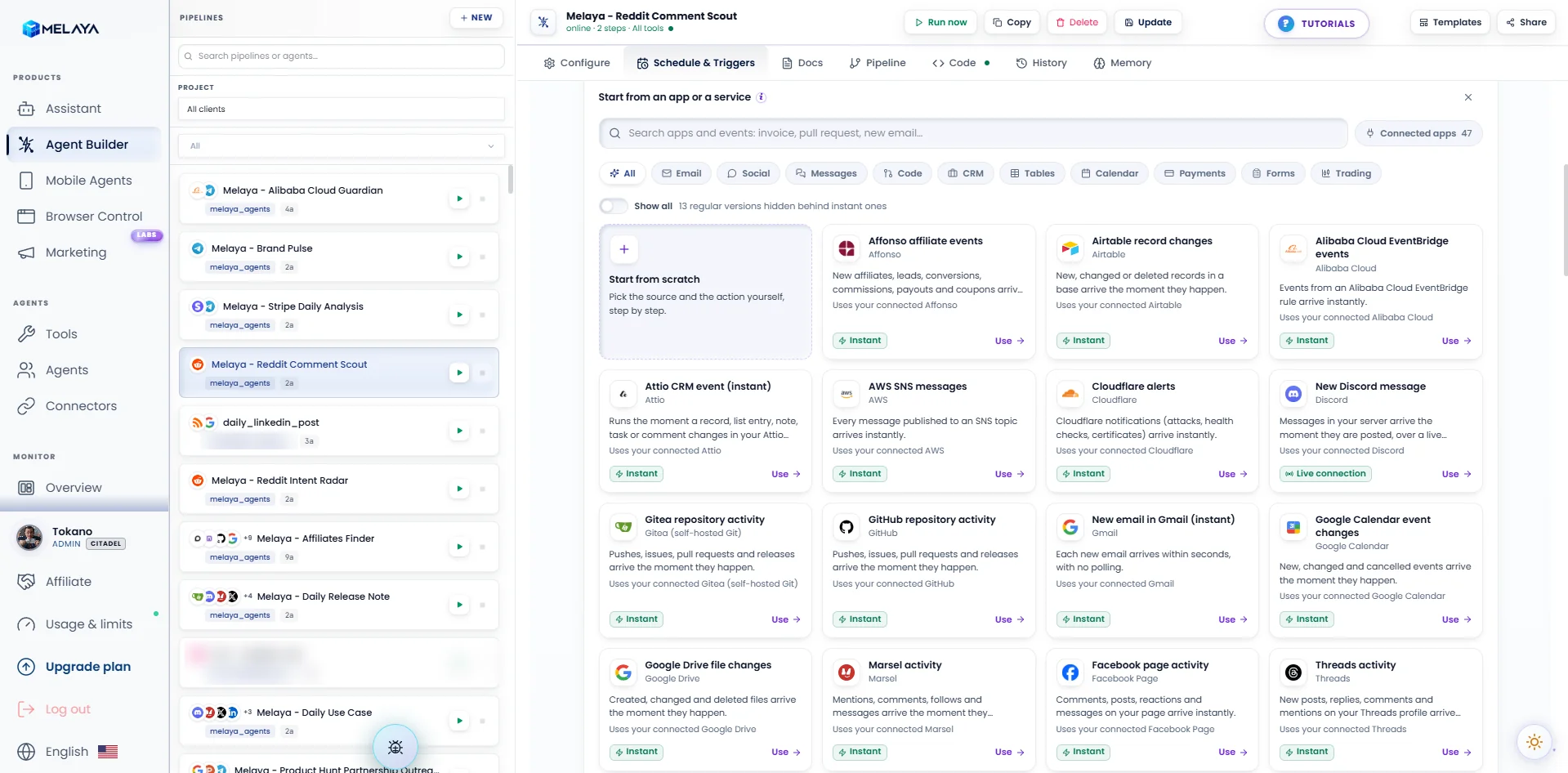
A trigger can apply a simple filter, optionally ask System One a question, and choose an action: notify the user, call an allowed tool, wake a running crew, or start a pipeline. The action remains subject to the user's authorization and autonomy settings.
For example, a new message could be classified before waking a research workflow. An irrelevant item can stop at the filter. An uncertain one can be brought to a person. The design supports one selected action per event, making the outcome easier to inspect.
The pipeline canvas now opens with a Starts from section, so anyone reading a pipeline knows when it runs and from which source before looking at the steps. The human approval policy still applies to what the steps do.
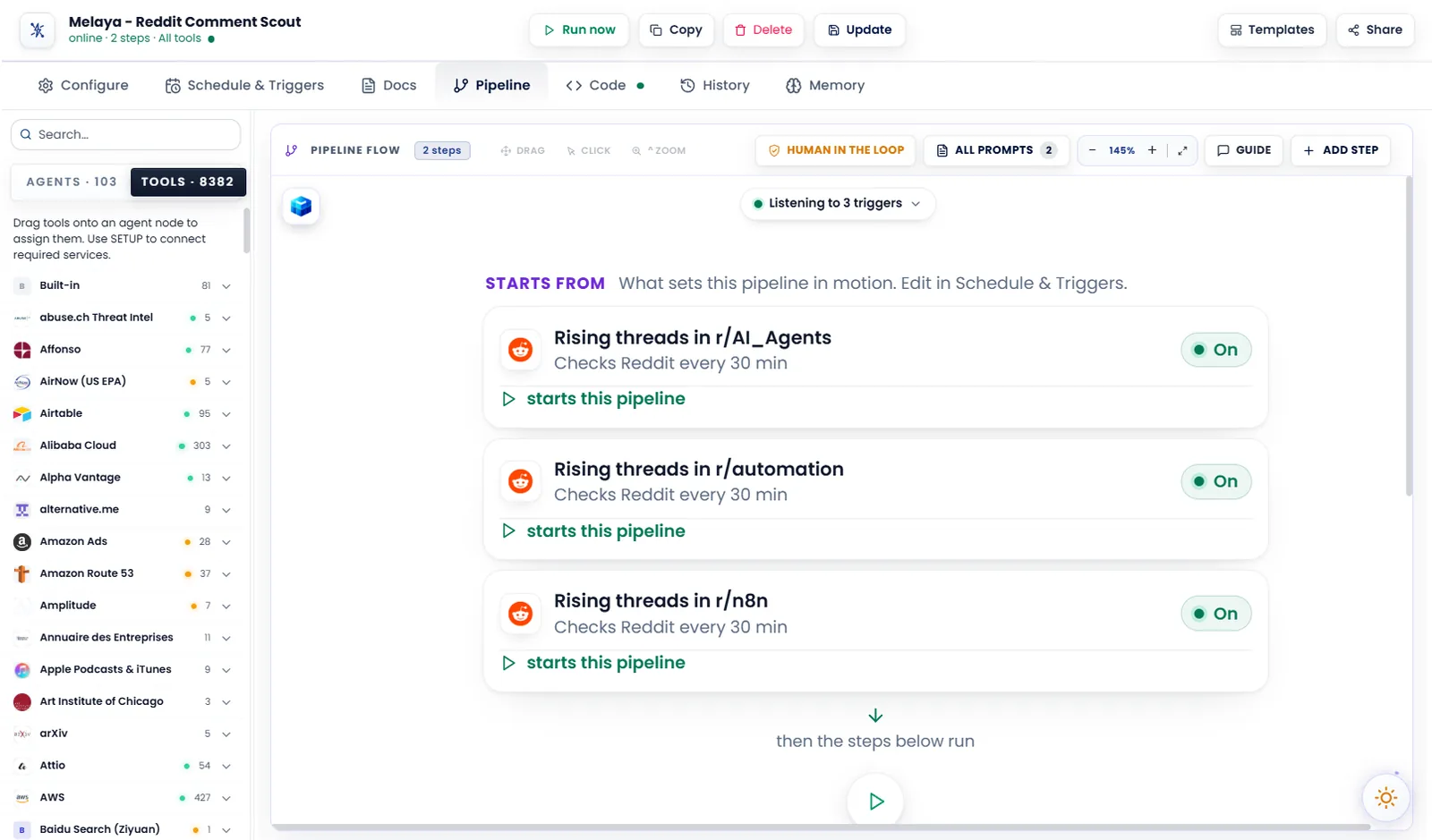
The less visible work matters here: signature checks, duplicate handling, tenant checks, bounded queues, retry behavior, and quotas. Without them, a repeated webhook could become repeated work, or one noisy source could crowd out everything else.
Later September changes added REST and MCP diagnostics, live event history, confidence-gated presets, and better explanations for empty polling results. The user needs to see why nothing ran as well as why something did.
This layer is in beta. It was deployed to production on September 24 for Forge plans and above. Each source still needs its own provider setup, and not every adapter is available for every account. Ordinary cron schedules and the running workflows below should not be confused with that broader rollout.
7. 48 AI providers, plus GitHub Copilot: choose the LLM for each task
The generated catalog grew from 23 to 48 AI providers between the August baseline and the September 29 snapshot.
September additions span direct hosts, routing gateways, enterprise endpoints, and subscription-linked routes. Examples include Azure AI Foundry, a generic OpenAI-compatible connection, GitHub Copilot, Writingmate, Featherless, and a larger group of hosts and gateways including Together, Fireworks, DeepInfra, Cohere, Amazon Bedrock, and LiteLLM.
The practical benefit is per-job choice. A builder can use one model for inexpensive classification, another for research, and another for a difficult reasoning step without rebuilding the connected workflow.
Use the GitHub Copilot subscription you already have
GitHub Copilot became an AI provider on September 3. Like Claude Code and Codex, it runs on the user's own runner: Melaya reuses the Copilot sign-in already present on that machine, from the editor or the GitHub CLI, so an existing Copilot subscription can power agents, the Assistant, and the browser cockpit without creating a separate API key. If no sign-in is found, the runner can start one.
Usage is billed by GitHub under the user's Copilot plan, not metered by Melaya. Copilot's own model list, context limits, and terms still apply, and some models accept smaller inputs than their direct-API equivalents.
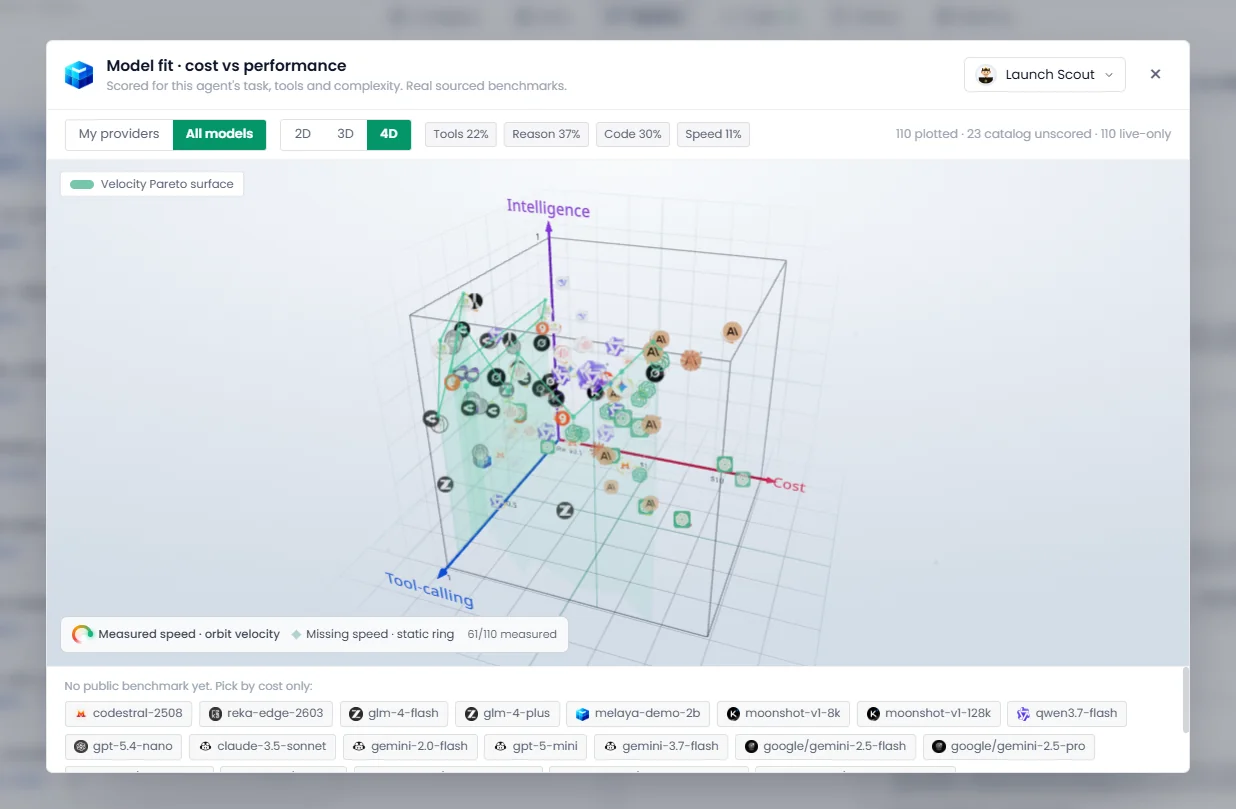
Price alone does not describe how a model behaves with tools. The comparison surface helps builders consider capability, cost, and available performance evidence together.
Provider-native web search also became available through each agent's own provider where supported. The answering engine and its costs need to be attributed correctly; unsupported search should not be charged as though it succeeded.
Much of the month's model work was compatibility work: preserving Gemini tool-call signatures, handling streaming behavior, retrying certain empty responses, improving provider-error classification, and keeping long answers alive without misidentifying them as stalled runs.
For first-time users, Melaya AI moved to a small Demo 2B model based on MiniCPM5-2B. It is positioned as a limited demonstration available across tiers under daily token caps. It helps people try the workflow before connecting another provider; it is not presented as a replacement for a frontier model.
Catalog coverage is not a claim that every model and endpoint was tested with every real customer credential. Provider availability, billing, supported features, and usage terms still apply.
8. 8,350 AI agent tools and integrations, including Databricks and Centercode
The September snapshot records 8,350 tools, 111 specialist agents, and 16 crews. The tool count is 1,717 above August's 6,633.
The additions cover marketing, analytics, advertising, search, DNS, content, sales, and public research. September work connected more webmaster and analytics services, expanded campaign operations, added OAuth sales and marketing connections, and broadened research across publications, creators, communities, and software ecosystems.
Klaviyo received a substantial expansion. Notion and Yandex Webmaster gained one-click OAuth connections, five OAuth marketing and sales connectors and ten public outreach connectors were added, and Substack can now sign in on the server so the password never reaches an agent or a run. GitHub, Reddit, and Zoho connection paths also received attention, alongside multi-account support (Zoho Mail first) and server-managed token refresh where applicable.
The month closed with two more complete integrations on September 30: Databricks, now connected through full OAuth so agents can work with a workspace under the user's own authorization, and Centercode, integrated end to end with direct links from its tools into the catalog.
Public tools should not ask for credentials they do not need
Some tools use public endpoints even when their parent connector also contains authenticated actions. September made that distinction explicit in the registry and corrected false missing-connector warnings in the builder.
A public research tool should be usable without pretending it requires an account connection. An authenticated write must still use the appropriate authorized account.
Project credentials became more consistent across execution paths, including SDK and REST connector calls. The selected connector source now survives saving the pipeline. These are small details until an otherwise correct workflow reaches the wrong account.
A good agent still needs reliable rows, documents, and files
Google Sheets tools gained header-aware object input and more predictable append behavior, including avoiding accidental copying of header formatting into new rows. Large document reads and email outputs were made more complete. File-backed batch scoring keeps the source data intact instead of asking the model to recreate it.
Research tools also received practical fixes: rejecting placeholder email addresses, accepting valid newer domain endings, improving Substack discovery, handling certain redirect loops, distinguishing blocked pages from real content, and bounding search and extraction work.
Generated documents can use the business's brand kit. OCR concurrency is bounded so a document-heavy task does not launch more expensive work than the environment can support. None of these changes makes scraped data infallible; together, they make it easier to preserve sources and notice when the evidence is incomplete.
9. AI automation in practice: how Melaya runs its own company
The most useful examples this month came from using Melaya to operate Melaya.
For this recap, we inspected the account's saved configurations, current scheduler state, and selected run outcomes through the Melaya MCP server. The Melaya project had 11 enabled schedules at that snapshot. Ten had recorded a scheduled firing; the remaining newly enabled schedule had a successful manual run.
Those are operational facts, not a claim that every scheduled task succeeds or that each workflow was first created in September.
Turning development into readable updates
The daily release-note workflow starts from repository changes and prepares a user-facing update for review and distribution. It can fall back to a useful product spotlight when there is no suitable release to announce, and uses memory to avoid repeatedly telling the same story.
The daily use-case workflow begins from a practical problem, explains how Melaya could address it, and adapts the content to its destinations. Its configured publishing steps use human approval.
Selected recent runs of both workflows completed successfully. That supports saying the workflows ran; it does not establish how many readers they reached or whether the posts generated customers.
Researching possible affiliates and partners
The affiliate workflow is a larger example: inbox triage, reply handling, five parallel scouts, qualification, and outreach preparation or delivery under its configured policy. Scouts cover podcasts, YouTube and TikTok, newsletters, creator platforms, and builder communities.
A shared spreadsheet acts as the working ledger. Its job is to help preserve findings, track decisions, and avoid repeatedly approaching the same contact. Contact verification and reply escalation are part of the workflow, rather than afterthoughts.
Other saved workflows research Product Hunt opportunities and Hacker News launch partners. The interesting design is the sequence: find a relevant signal, inspect the real product or person, qualify the fit, and preserve what happened.
Reporting and community work
Additional schedules cover Stripe reporting, brand monitoring, infrastructure checks, community activity, AI content, and weekly event discovery. These are recognizably small-team jobs: useful work that needs repeating and usually competes with building the product.
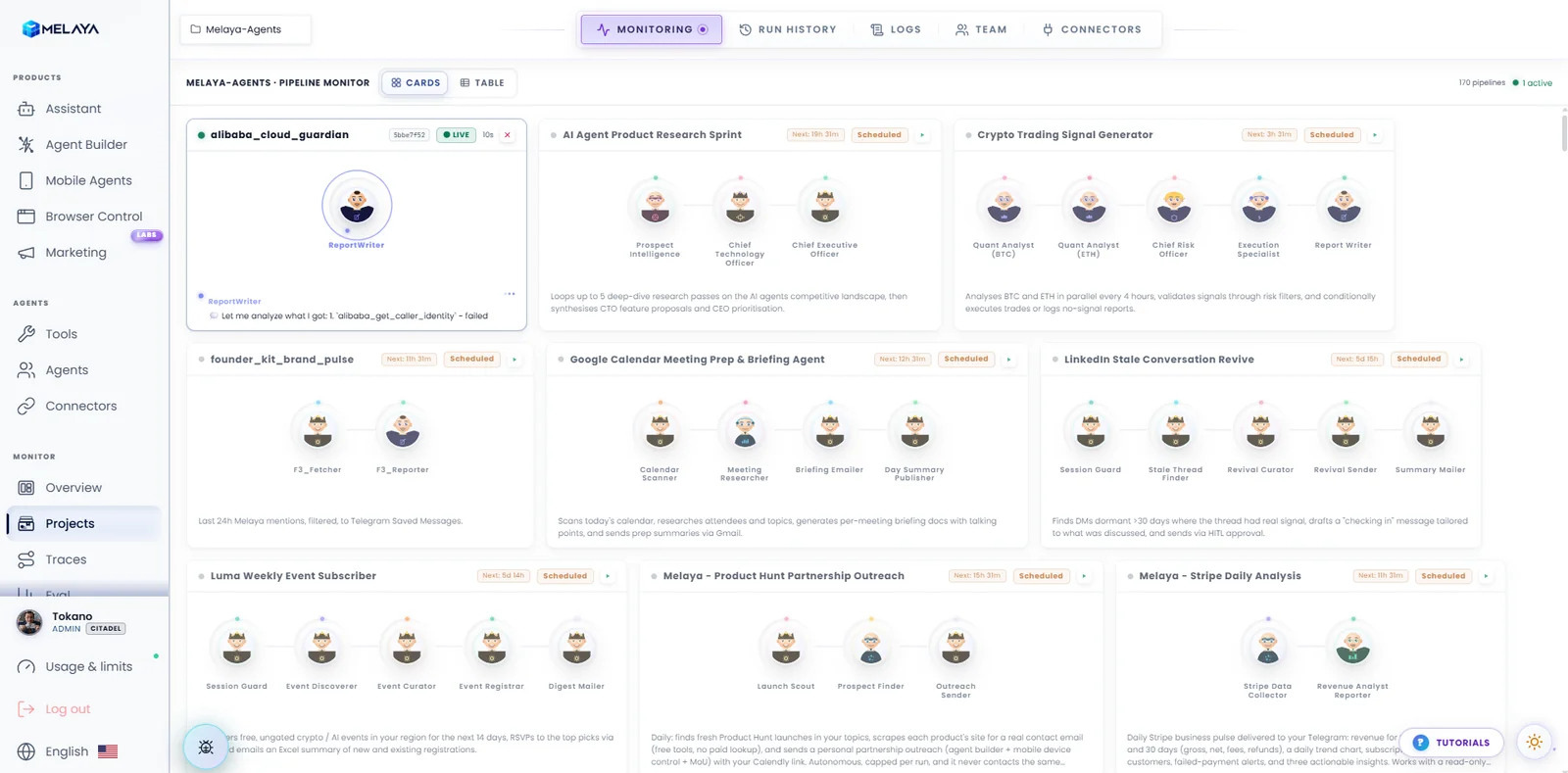
Running our own reporting, content, and research tasks exposes failures that a prepared demo can miss: incomplete tool results, repeated outreach, unclear approvals, and account-selection mistakes.
The failures belong in this story too
The sampled recent runs included successful content, community, reporting, and research jobs. They also included failed affiliate and Product Hunt outreach runs.
We are not turning that small sample into a success rate. It does not justify a claim about revenue, meetings booked, hours saved, or a business running unattended.
It does show why accurate run status matters. A finished process can have failed its task. The monitor, logs, and follow-up should preserve that distinction so a person can decide what to repair and retry.
10. No-code AI agent builder: parallel multi-agent pipelines at scale
Larger real workflows put pressure on the canvas. Five parallel agents, long prompts, and many tools can make a technically correct pipeline difficult to read.
September's builder work made parallel agents flow across rows, with a maximum of three per row and centered incomplete rows. Prompts moved out of permanently oversized canvas boxes into focused editing controls. Connector logos and grouped tools make it easier to understand what an agent can access.
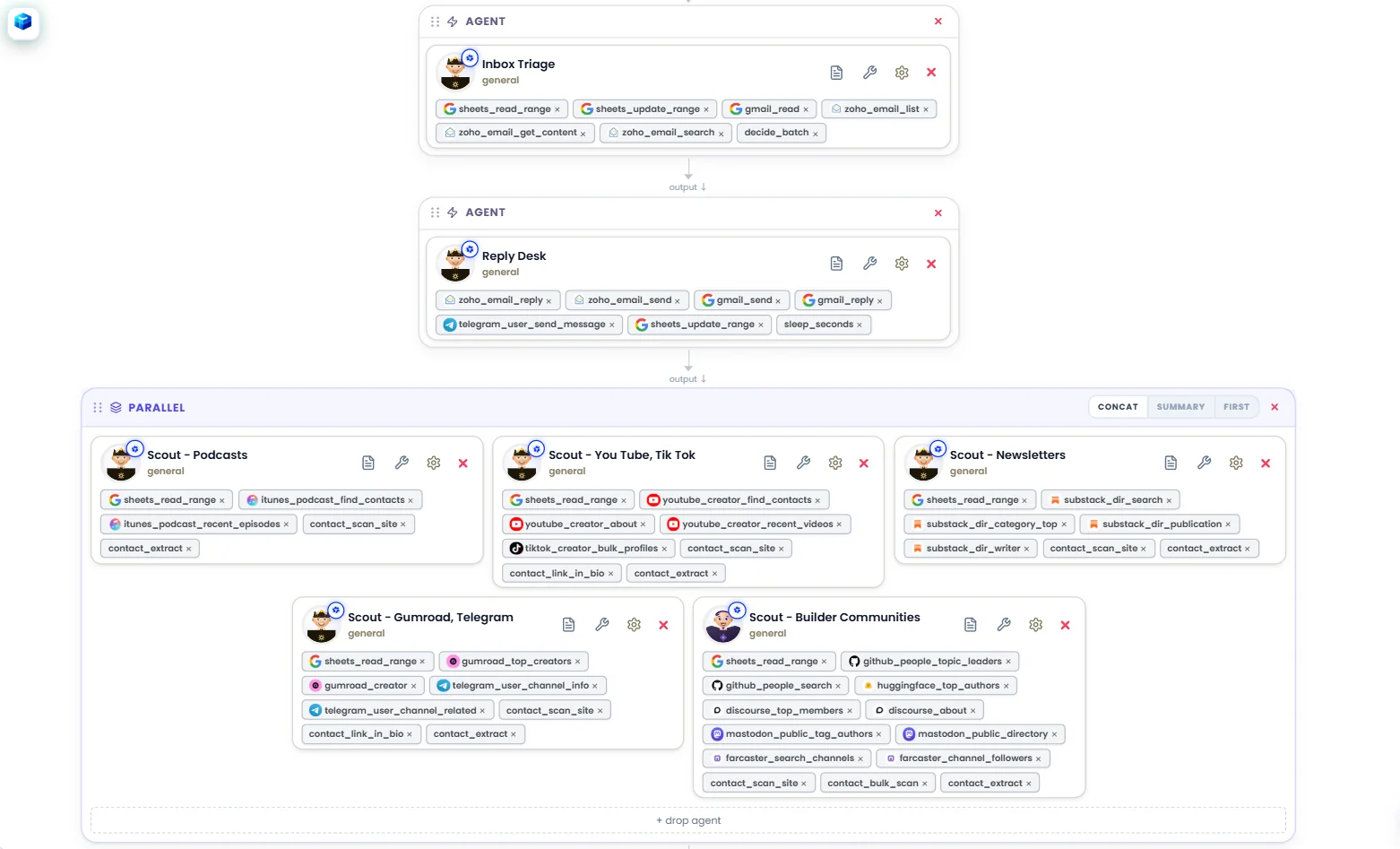
The guide gained the Decide step and a layout that stays inside the available viewport. Agent settings moved away from the outdated idea of inherited “pipeline tools” toward the tools assigned to that agent, with a searchable, grouped catalog and dynamic counts.
Editing and live monitoring received performance attention too. Prompt edits no longer need to force the whole canvas through expensive work on every keystroke. Live agent text uses narrowly subscribed, frame-coalesced updates so an active stream does not repeatedly redraw unrelated parts of the page.
Under the interface, per-agent iteration limits and cost controls became more consistent. Monitoring can show each agent's model and support changes from the relevant context. AI-generated pipelines preserve agent tool assignments, while memory, retrieval, and evaluation behavior are made more intentional.
The Assistant also gained provider-agnostic specialist delegation on supported cloud paths. A larger task can be divided into bounded specialist work while staying within the parent's permissions and shared constraints. Delegation is useful when the subtasks justify it; it should not turn a simple request into unnecessary model calls.
11. AI agent security: CASA AL1 with TAC Security and Google OAuth approval

On September 21, we confirmed CASA AL1 completion with TAC Security and Google OAuth app approval. CASA (the Cloud Application Security Assessment) is the security assessment Google requires for apps that request sensitive Google account access; TAC Security is the authorized lab that assessed Melaya. The approved OAuth app means people can connect their Google accounts to Melaya through Google's standard consent screen.
These are distinct milestones with defined scopes. They do not amount to a blanket security certification of every workflow or a Google endorsement of Melaya. Google approval also does not remove product-specific requirements such as a Google Ads developer token. Users still need the permissions and credentials required for the service they are accessing.
Testing the boundary between accounts
Before the assessment, we ran our own authorization test across the whole API reference: seven parallel testing agents and roughly 250 probes covering authentication and MFA, credentials, pipelines and runs, approvals, the Assistant and memory, connectors, phone and browser pairing, administration, and common web attacks such as injection and server-side request forgery, using two separate accounts.
No probe could read or change another account's data, every human-approval gate held, and no privilege escalation was found. The test did find one real gap: the routes that create, pause, or resume a pipeline schedule were missing the project-membership check their sibling pipeline routes already enforced. It was fixed the same day.
An OWASP-guided hardening pass followed, along with work on session revocation, password and MFA flows, expiring OAuth state, administrator controls, upload validation, container isolation for cloud runs, and tenant authorization for builder documents, retrieval data, and outputs.
Clearer recovery when something goes wrong
The browser and Assistant received clearer stop feedback, more precise recovery cards, and better separation between a provider error and an error inside Melaya. Usage accounting also became more specific, including correcting browser-message counting and handling failed Assistant turns.
For a person supervising an agent, trust often comes down to a few practical questions: Which account is being used? What action is being approved? Did it complete? Can I stop it? Can I inspect what happened later? Much of September's engineering was directed at making those answers clearer.
12. AI partnerships: Databricks, Writingmate, Flowlines and 500 users
September's public partner additions were Writingmate and Flowlines, building on the BeejTech and Marsel relationships covered in August. Melaya also became a Databricks connected partner, alongside the full Databricks OAuth integration described above.
Writingmate connects another model route to governed workflows
The Writingmate article explains how its OpenAI-compatible route connects to Melaya's agents and tools.
The usage boundary matters: Writingmate's API documentation describes an alpha offering for personal, local, and internal use, while production or customer-facing deployment requires a separate written agreement. A Melaya subscription does not include a Writingmate entitlement. See the official Writingmate API documentation for the provider's terms.
Flowlines adds visibility into MCP operations
The Flowlines integration gives technical MCP activity an observability path. The September integration records operational metadata rather than exporting message bodies, screenshots, or tool arguments and results as part of that telemetry.
This is a live technical integration and public partner listing. It is not a claim of an exclusive relationship, formal certification, or a signed wider co-marketing agreement. The useful outcome is concrete: more visibility into how the MCP service behaves.
Five hundred people, and better ways to participate
Melaya passed 500 people who have tried the product, following the first 100 in August. That is a reason to be grateful and listen closely, not a substitute for retention or paid-customer metrics.
Melaya was also listed on a run of launch platforms and directories during the month, including GitHub's featured badge, MarketHunt, Fazier, TinyLaunch, DeepLaunch, IndieHunt, EarlyHunt, and SaaSHunt. The Backlinks workflow described above can now detect several of these listings automatically.
The company overview gained an access-controlled map for organizing internal context. Public-facing work improved launch media on mobile, branded assets, lifecycle and newsletter presentation, localized content, and the accuracy of product and use-case pages.
13. AI agent guides, tutorials and faster pages
Four September-dated articles in the public registry provide deeper explanations of the month's work:
- Melaya MCP server: connecting an external AI client to Melaya's authorized capabilities.
- Writingmate and Melaya: another model route, with its usage boundaries.
- What the Hell Is Jev?: structured decisions, System One, and local Laya.
- Flowlines MCP observability: visibility into the technical operation of the MCP service.
The August recap was added to the repository in September but remains an August retrospective. Partner articles still marked as drafts are not counted here as public announcements.
Beyond the blog, the month expanded and translated the guide library, revised use-case and comparison pages around the current product, improved FAQs and crawler-facing material, and aligned illustrated workflows with what the accompanying text actually promises.
Public pages also became lighter. The recorded September build comparison reduced landing-page JavaScript from roughly 4.5 MB to 2.1 MB. Blog content now loads per article instead of downloading every article's Markdown to read one. Those are delivery improvements, not a guarantee of the same speedup on every device and connection.
Recovery from stale application chunks and deployment cache mismatches received attention too. People should be able to reach the explanation and the product without first diagnosing a front-end deployment.
How to start automating with AI agents
Start with one recurring job whose result you can recognize.
For a website, run an audit and choose one finding to investigate. For a browser task, connect the existing session and grant the tabs the task actually needs. For a repeated research job, build a short pipeline with explicit tools, a clear output, and an approval before the consequential action.
Then inspect the run. Did it use the right account? Did it preserve the source data? Did it stop when it lacked evidence? Did the approval tell you enough to make a decision?
The strongest change in September was that these questions became connected across more of Melaya: research, decisions, tools, browser actions, review, and operational history. The Agent Builder and Browser Control are useful starting points; plans and pricing explain the access and execution boundaries.
We will keep measuring the product by completed, inspectable work. The community's reports, including the frustrating ones, are helping us make that standard more concrete.