- 01 / 15
Permissions & privacy
Scope each user, project and agent to the tools, pipelines and resources it needs, for least-privilege access. Connector credentials are encrypted at rest and reach pipeline runs through single-use handles. Row-level security keeps accounts apart. Device agents touch only the apps and sites you allow. Event payloads and stored memory are fenced as untrusted data to limit prompt injection. Sether privacy redaction and Koreshield action scanning are opt-in per agent or chat.
- 02 / 15
Human approvals
Human-in-the-loop AI agent approvals pause the actions you choose before they run. Safe mode is the default, and autonomy is a setting you turn on. Approve, reject or edit the arguments from one approvals sheet on desktop or phone. Each decision is recorded with its run. Browser and computer actions are gated by effect type, approvals on triggered runs expire, and a stop switch ends a run.
- 03 / 15
Evaluations & evidence
Agent evaluation looks at evidence, not only the final reply. Melaya inspects each tool result for auth errors, empty data, unconfirmed writes and replies that call a source unavailable when it returned data. Opt-in checks cover output schema, grounding and citations. Observe mode scores runs on a dashboard. Enforce mode retries with a correction note, up to a set limit. An optional LLM judge can reject a reply but never approves one alone.
- 04 / 15
Traces & observability
Every run gets an ID, a live view and a stored history. LLM tracing records OpenTelemetry spans for model and tool calls, with latency, inputs, outputs and token counts. A tool-call audit ledger shows which agent called each tool, which model asked for it and who approved it, and it is available over the REST API. Token cost tracking prices every call. Known secret patterns are redacted before storage, and access follows project membership.
- 05 / 15
Reliability & recovery
Guardrails check every tool call before it runs. Melaya validates arguments against the tool's schema, fixes safe type mismatches and returns a clear error so the agent can repair its own call. Timeouts, retries with backoff and circuit breakers absorb flaky APIs and rate limits. Write actions run one at a time, oversized results move out of the context window, and every agent loop has a step limit.
- 06 / 15
Schedules & events
Run scheduled AI agents on a cron schedule in your time zone, or start them from events. Melaya receives signed webhooks, push subscriptions on connected apps, WebSocket and SSE streams, and polls as a fallback. Optional filters and Laya questions decide whether an event matters. Each event then does one thing: notify you, call one tool, wake a running crew or start a pipeline. Every delivery leaves a receipt.
- 07 / 15
Agent orchestration
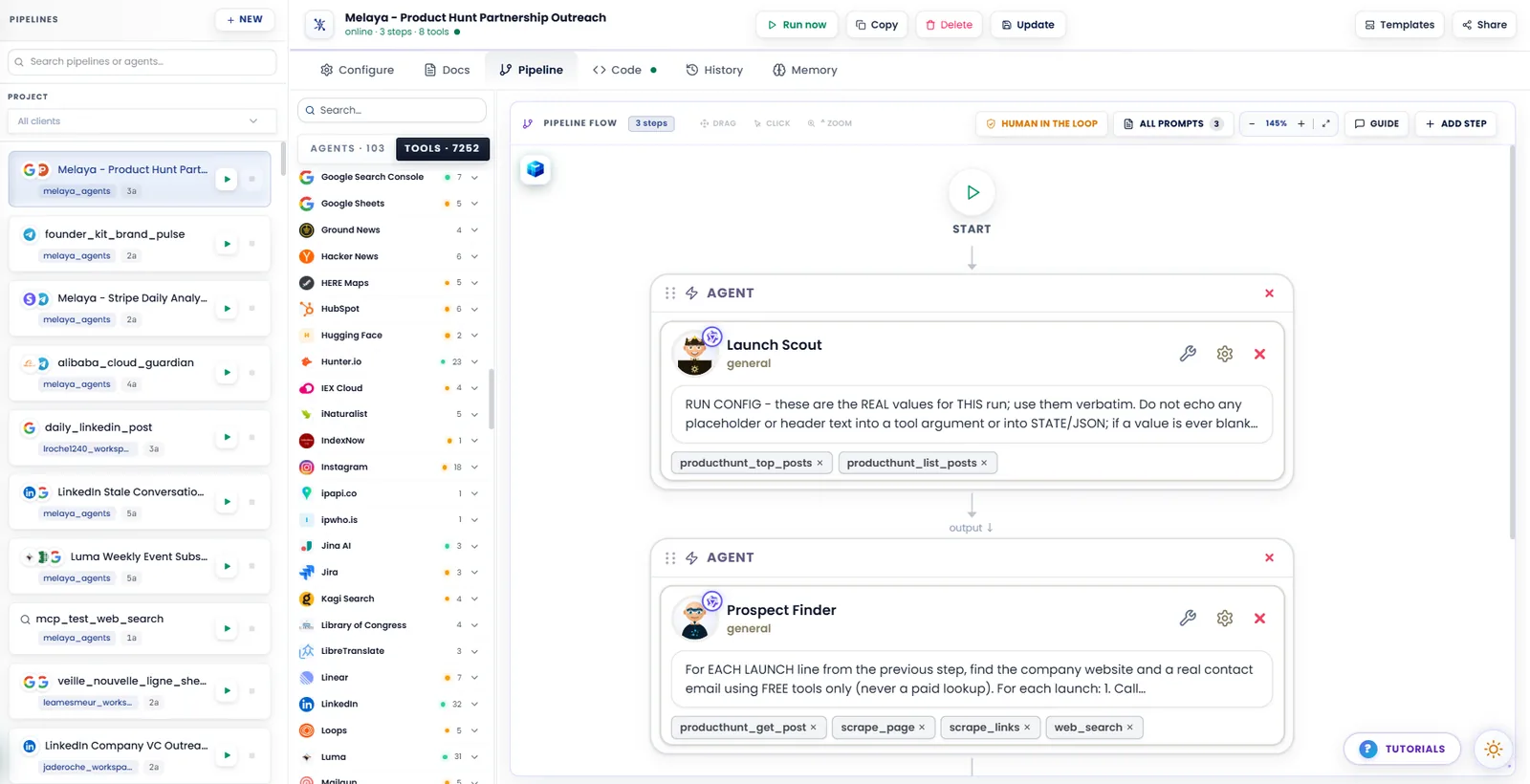
Multi-agent orchestration on a visual canvas. Run AI agents in sequence or in parallel, branch on an agent's output, repeat a step in a bounded loop, or draw a graph that routes work between steps. Start from reusable crews of prebuilt agents for research, finance, sales, legal, HR and operations. In the Melaya Assistant, a lead agent can hand a sub-task to a specialist sub-agent.
- 08 / 15
Instructions & inputs
Give each AI agent a role, a system prompt and a task instruction, or start from a prebuilt persona or a pipeline template your team can share. Describe a goal in plain language and Build with AI drafts the multi-agent workflow. Each run can take a brief and attached files such as PDFs and spreadsheets. Melaya generates and validates the pipeline code on the server before it runs.
- 09 / 15
Laya · System One
Laya is an open-weight System One model that Melaya hosts. It answers typed choice, score and yes-or-no questions with calibrated confidence and no generated text. Agents use it to classify or rank many items in one call, filter event triggers and run decision steps in pipelines. In browser, phone and computer fast mode it is a narrow fallback for ambiguous targets. Your main AI model still plans.
- 10 / 15
Tools & integrations
Give each AI agent only the tools it needs, picked from a large catalog of typed tools and API connectors for email, CRMs, spreadsheets, databases, payments, social media and the web. Connect business apps with OAuth or an API key, kept encrypted. The Assistant loads extra tools on demand to keep prompts lean. Melaya runs a remote MCP server, so Claude, ChatGPT, Cursor and other MCP clients can run your pipelines with scoped permissions.
- 11 / 15
Devices & computer use
AI computer use with a safety loop. Agents operate a real web browser, an Android phone and the desktop apps on your own computer. Every step follows read, act, verify: read the page or accessibility tree, act on a named element, then confirm the change. Fast mode runs several planned steps per model call. Allow-lists for apps and sites, approval gates and a stop switch cover every device.
- 12 / 15
Memory & context
Melaya keeps agent memory inside each model's context window. Working memory compacts older turns into a summary, and long tool results are paged instead of cut. Persistent cross-run memory is opt-in per pipeline: agents keep lessons and tool failures for the next run, scoped per agent, with secrets redacted. You can review, edit or delete every entry. The Assistant keeps its own conversation memory.
- 13 / 15
Knowledge & retrieval
Ground AI agents in your own PDF, Word, Excel and PowerPoint files. Short documents go straight into the prompt, and long ones are outlined and read page by page. For large collections, switch on retrieval mode: Melaya indexes the files in a vector store and agents search them with RAG. Connect Obsidian vaults from your computer, an upload or a Git repository, and choose per agent which knowledge it sees.
- 14 / 15
Models & providers
Melaya is bring-your-own-model. Pick the LLM for each AI agent from OpenAI, Anthropic, Google Gemini, Mistral, DeepSeek, Qwen and dozens more providers, or route through OpenRouter, LiteLLM and other gateways. Run open-weight models locally with Ollama or LM Studio, use your Claude Code, Codex or GitHub Copilot subscription through the local runner, or point at any OpenAI-compatible endpoint. Mix models in one pipeline.
- 15 / 15
Runtime & budgets
Runs execute in an isolated cloud sandbox or on a self-hosted runner on your own computer or server. Pipelines that need local models or your logged-in sessions run on the runner. Cloud runs are sized to their tools and queued when capacity is busy. Optional cost caps per pipeline or per agent alert at 80% and stop the run at the limit. Plans set run quotas, concurrency and schedule frequency.
A map of Melaya’s capabilities. Availability depends on the product, plan and configuration. Optional guards, persistent memory and evaluation enforcement must be enabled.
























 Agents
 Assistant
 Device Control
 Browser Control
 Computer Control
 MCP Server
 Marketing











 Melaya Assistant











 Melaya MCP