Your model can work out what needs doing. October was about giving it somewhere to do it: your browser, your Android phone, your desktop apps and your business systems, with the tools and controls staying in place when you change the AI.
If you use OpenRouter, Qwen, Ollama, LM Studio or another open-weight model, you probably know the gap. A good answer is not the same as an updated customer record, a finished spreadsheet or a task completed in an app with no API.
Melaya connects those two worlds. You bring the AI. Melaya supplies the connected tools, device execution, knowledge, workflows and permission controls around it.
October 2026 brought Computer Control, faster browser and phone execution, Obsidian vaults, assistants in Slack and Microsoft Teams, standalone product subscriptions and a much deeper Odoo integration. This recap explains what changed, what it is useful for and where to start.
Open-weight AI agents: what October changed for your work
Here is the month in practical terms. These are additions and improvements to Melaya, not seven separate AI subscriptions you need to buy.
| Product | October improvement | What you can do with it |
|---|---|---|
| Melaya Agents | Device toolkits, machine selection, bulk model changes, Team AI and clearer run controls | Build a process once, change its model, and let the right people run it |
| Melaya Assistant | Workspace actions, tools loaded when needed, per-conversation setup and better file delivery | Ask for work across your connected systems, then turn useful work into a pipeline |
| Melaya Device Control | Fast Mode, stronger batch checks, specific-phone targeting and a redesigned mobile experience | Operate allowed Android apps without waiting for a dedicated API integration |
| Melaya Browser Control | Fast Mode, reusable plans, background work and separate tabs for concurrent agents | Fill forms, collect information and work through approved websites |
| Melaya Computer Control | A desktop app, native app access, checked action sequences and manual takeover | Work in desktop software as well as browser tabs |
| Melaya MCP Server | Computer tools, stored plans, clearer scopes and better client compatibility | Give a compatible AI client access to Melaya without moving every task into another chat |
| Melaya Marketing | Whole-site SEO, search-demand discovery, smarter backlink workflows and expanded ads controls | Find what matters, inspect the evidence and act through connected accounts |
OpenRouter and Qwen tools: keep the model, add execution
An AI router helps you choose and reach models. A model generates an answer or proposes a tool call. Something still has to run that call, check access and return the result.
That is where Melaya fits. It is useful whether your reason for choosing an open-weight model is cost, deployment flexibility, customization or keeping particular workloads on your own infrastructure.
- Choose the brainUse a suitable Qwen model, a model through OpenRouter or LiteLLM, or your local Ollama or LM Studio setup.
- Connect the toolsUse Melaya Agents or Assistant directly, or connect a compatible MCP client to the Melaya MCP Server.
- Set the reachChoose the connected accounts, vaults, browser tabs, phone and computer apps the work needs.
- Do and checkMelaya executes through those controls and returns results you can inspect. Approval behavior follows the surface and autonomy setting.
October made that setup easier with Sign in with OpenRouter, clearer recovery when a provider reaches its limit, and better detection of models running on your computer. The provider catalog also expanded with Eden AI and Sarvam AI. A provider connection and a model's actual tool or image capabilities still matter: a text-only model does not become a vision model because it has tools.
For MCP, the important detail is the client. An OpenRouter API key or a Qwen model alone does not connect to an MCP server. Use an MCP-capable application that supports your chosen model, or choose the model inside Melaya. Private OpenAI-compatible endpoints, including suitable vLLM or llama.cpp deployments, need the corresponding supported configuration and network access.
Read the model-router and open-weight setup guide or the Melaya MCP Server walkthrough. Your AI provider bills its inference separately; Melaya access does not include an unlimited supply of model tokens.
AI browser and Android automation: fewer trips back to the model
Imagine giving someone directions. You could phone them after every turn. Or you could say, “Open the page, enter these details, check the result, then come back if something looks wrong.”
October added the second approach through browser_fast and phone_fast, then improved it across the Assistant, pipelines and MCP. Your main model plans the work. Melaya carries out the short sequence against the live interface and returns control when it needs help.
Laya, Melaya's System One decision model, handles narrow judgments where needed, such as matching a description to a control or deciding whether a list row meets a condition. An exact visible label can be resolved without asking another model at all. Laya does not replace your main model or secretly plan an entire job.
- Describe the next steps in plain language
- Find their targets on the current screen
- Check progress and return control at an unexpected state
- Batch exact steps when their targets are already known
- Use expectations and inspect failed or unrun steps
- Reuse a stored plan without asking the model to rewrite every step
One retained browser example makes the difference tangible: opening a Luma event, checking its panel, closing it and checking the list took one Fast Mode call and 6.1 seconds in a live Brave rerun on October 17. The October 6 one-step-at-a-time baseline took six calls and 108 seconds. These are dated observations of one task, not a controlled comparison of every model, site or connection.
On Android, a separate retained test collected 20 Reddit posts, including subreddit, age, votes and comments, in 16.2 seconds. That is a phone result, not a browser benchmark. We keep the surfaces separate because page loading, app behavior and the requested task change the result.
The more general improvement is fewer large-model round trips for routine work. It can reduce repeated context and waiting, without promising a fixed token saving on every job. See the System One explanation and Fast Mode product guide.
Browser Control also gained separate working tabs for up to eight concurrent agents, subject to your plan and available sessions. A tab held by one agent is not silently taken over by another. Background navigation became less disruptive, while the extension continues to enforce site access and the chosen autonomy mode.
On phones, you can target a particular device for a pipeline. Batch results better distinguish a locked phone, a missing accessibility service, a refused app and an action that did not complete. Those details save time when the problem is setup, not the model.
AI computer use: bring desktop apps into the workflow
Browser automation stops at the browser. October's new Melaya Computer Control extends the same idea to native desktop applications.
The desktop app brings the local runner into an installable application, with connected machines, model setup, update status and a visible way to stop control. Computer tools are available through the Assistant, pipelines and MCP when the relevant access is granted.
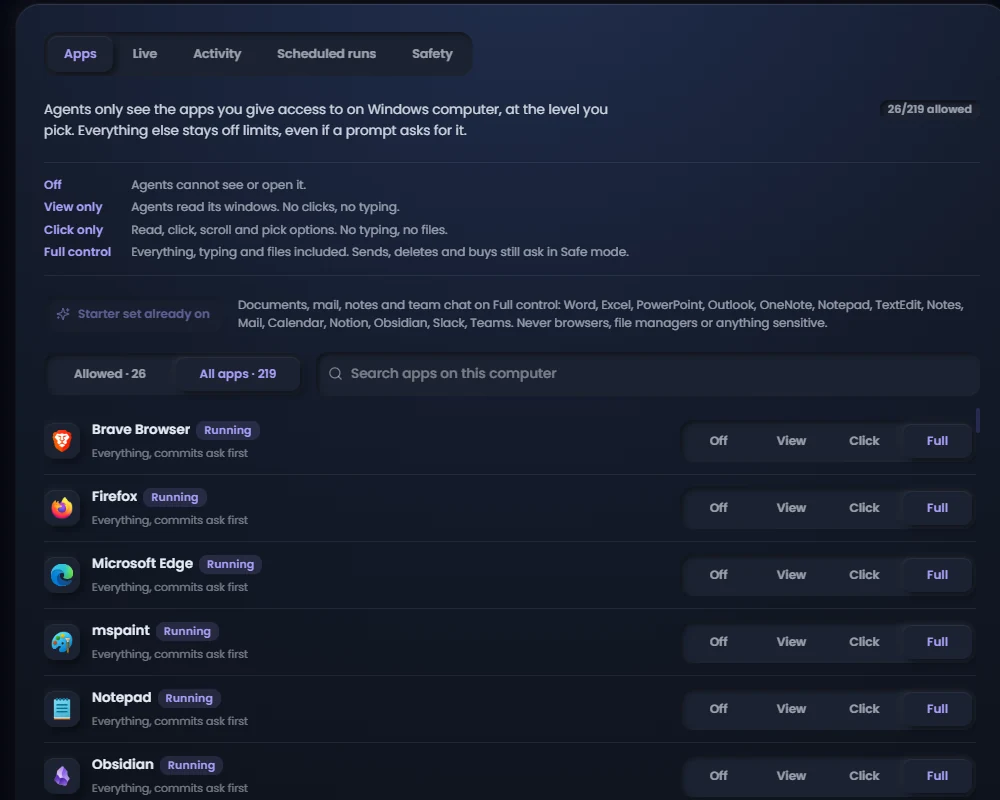
Choose whether an app is off limits, readable, clickable or available for fuller control. A model's request does not widen that permission. Start with a simple task in one app, inspect the result, then expand only what the workflow needs.
Computer Control can read application controls, operate forms and tables, and use screenshots or bounded visual targets when an interface does not expose enough structure. It also supports batches, stored plans and Fast Mode. A result that cannot be verified is reported as such rather than treated as a confirmed success.
For users, the key feature is taking over. Moving the mouse or using the keyboard can pause execution, release held input and let the system reassess before continuing. Stop remains available. On the desktop, approval notices show the action that needs attention rather than a generic “something happened” notification.
For teams, machine selection means a pipeline can stay on the computer you chose. If that machine is offline, Melaya reports the problem instead of quietly moving work elsewhere. Linux server and VM setups are also documented; platform capabilities and setup requirements differ.
Explore AI computer use with Melaya and the current desktop downloads. The Microsoft Store announcement followed on November 3; it is a later milestone, covered in the Windows launch article, rather than an October store-release claim.
AI assistant for Slack and Teams: work where the conversation is
October brought Melaya Assistant into Slack and Microsoft Teams. Mention it or send a direct message, use your linked Melaya account, choose a model and work with your connected services. Relevant thread context can accompany the request.
The useful part is what happens after the answer. Generated files can return to the conversation. Charts can be delivered as images. A person can review an approval in the supported chat flow, and actions that need the full app have a route back to Melaya. Slack also gained an App Home view with setup and connection status.
The Assistant itself became more capable at operating your Melaya workspace. It can discover the relevant workspace tools, create or inspect pipelines and help manage runs. Tools load when needed rather than forcing the entire catalog into every request. Large results and long context can be read in pages, making room for the actual task.
Each conversation now keeps its model, connectors, autonomy and devices. Reopening a chat should mean returning to that chat's setup. Stream recovery, clearer provider-limit messages and saved download cards also make longer work less fragile.
Follow the Slack integration guide or Microsoft Teams guide. Installation, workspace permissions and member linking still apply; a channel mention does not grant everybody access to somebody else's accounts.
Obsidian AI agents: use your vault without flattening it
Your notes are more than a folder of text. Links, headings, properties, tasks and daily notes carry context that a plain file upload can lose.
October introduced Obsidian vaults as a knowledge source across pipelines, Assistant conversations, the extension and MCP. You can work with a vault on your computer, an uploaded snapshot or a supported Git-backed vault. An optional cloud copy makes a local vault available when configured, while showing its age if the computer is offline.
- Search notes, follow links and backlinks, inspect properties and tasks, and cite a note's heading.
- Choose the vault and folders a workflow can use, including project sharing where allowed.
- Choose whether cloud agents, cloud models, cloud copies and saved excerpts are permitted.
- Review write proposals through the applicable approval flow; revision checks refuse a conflicting overwrite.
- Use note-change triggers for follow-up workflows, with protection against repeatedly reacting to the workflow's own edits.
For a local Qwen workflow, this gives you a practical starting point: keep a vault local, choose a suitable local model, and ask for a cited summary before permitting any changes. “Local model” alone is not a promise that the whole workflow stays local. Your vault settings, other connectors, execution target and any cloud services determine the actual data path.
Some Obsidian app operations require Obsidian itself and its supported CLI or Local REST API connection. Uploaded snapshots are not a running Obsidian app, and a supported subset of features is not every plugin you have installed.
AI agent builder: change models without rebuilding the process
The value of a visual agent builder grows when a workflow survives the next model release.
October added bulk AI provider and model changes in Monitoring, with a reviewable selection and undo. You can inspect the models used by individual agents and choose the runner machine for work that needs your computer. Device kits make it easier to add phone, browser or computer capabilities to the right agent.
The AI-assisted builder now retrieves relevant Melaya guidance while planning. A reasoning-only agent with an explicitly empty tool list stays tool-free. Quality observation became the default for pipelines, helping surface issues without automatically rewriting the workflow.
Teams gained a Runner role between viewing and editing. A teammate can run the pipelines they are allowed to use without receiving the right to redesign them. Team AI lets an owner configure the project's model access; project provider credentials are not handed to a member's own computer.
Scheduling also became more practical. A local run can be held while its runner is offline and started within the configured reconnect window. Owners receive notices for held, missed or paused schedules. Run visibility and reconnection improved, so a dropped live connection is less likely to make working pipelines appear stuck.
For an enterprise using open-weight models, the benefit is architectural: evaluate a new model while keeping the workflow's tools, access rules and review points. Model behavior can still change, so test the workflow after a switch. Reusable infrastructure removes repeated setup; it does not remove evaluation.
AI SEO and marketing automation: a fix list backed by your site
A model can sound confident about your SEO without having crawled your website. October's whole-site audit gives the conversation actual evidence.
Melaya Marketing crawls the site within the plan's limits, checks technical issues and joins available Search Console and Bing data. It examines internal links, redirects, canonicals, language tags, duplicate content, sitemap problems and search performance. Search-demand discovery adds real suggested searches, without inventing search volumes.
The report connects issues to pages and products. It can suggest which page to improve, which topic needs coverage and which technical fix to do first. The Site Explorer adds filters, page detail, changes between runs and exports. A disconnected browser can reattach to a running audit rather than starting the work again.
The audit also gained checks relevant to AI search visibility: crawler access, structured data, JavaScript-only shells and inconsistent bot policies. These identify obstacles to discovery; they do not guarantee an AI citation or a Google ranking.
Backlink workflows became more efficient at filling forms, reusing scrubbed form knowledge and remembering failures. A submission is distinguished from a verified live listing. Social workflows gained clearer unanswered-message signals, contact lists, per-platform routes through API tools, browser or phone, and review cards that show the actual item being answered.
Google Ads tools expanded to cover campaign and country reporting, PMax placements, conversion goals, Search setup, budgets and bids, network settings, search intent and asset diagnostics. Platform reporting limits still apply, and changing an ad account remains an explicit action. The point is to make a recommendation inspectable and executable, not to promise profitable campaigns.
Explore Melaya Marketing. The free audit summary and paid AI-report capabilities differ; use the pricing page for the current product and plan limits.
Odoo AI agents and business integrations: connect work to records
On October 26, Melaya became an approved Odoo Learning Partner. This is the Learning Partner relationship, not a Ready, Silver or Gold designation.
The Odoo connector moved to direct Odoo 20 JSON-2 operations, with typed actions and version-specific corrections across business workflows. That lets an agent perform a specific supported operation rather than treating an ERP as a vague chat interface.
The Odoo app integration adds a record panel, pipeline runs tied to records, a recent-runs view, approval follow-up and an Add from templates workflow. Templates explain which Odoo apps and other services they need. Operations use the connected project's access, with writes reviewed through the Odoo integration's approval rules.
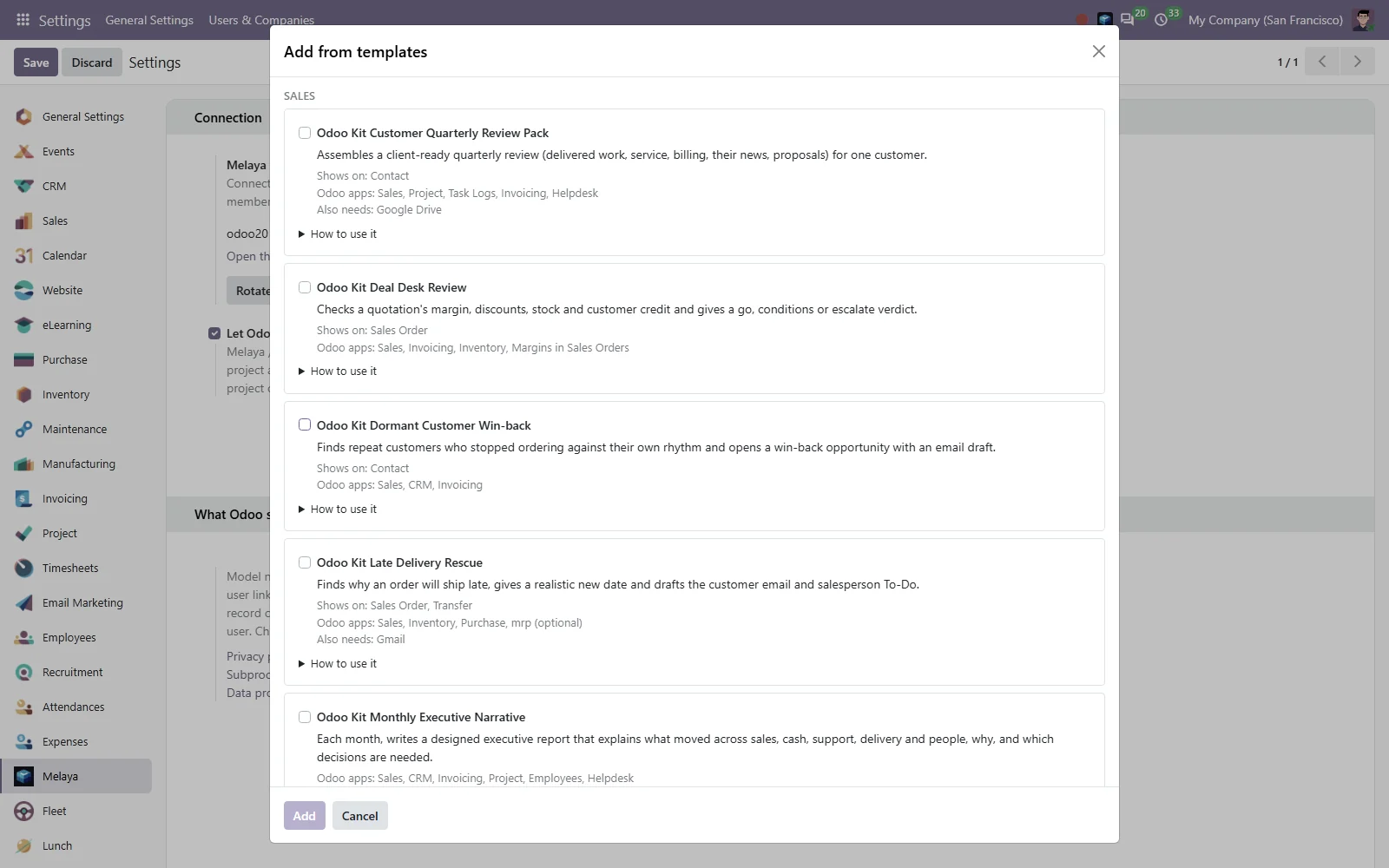
A customer review, a deal check or a late-delivery follow-up already has a place in Odoo. Pick the appropriate template, inspect its requirements and connect it to the records your team works with.
See the Odoo partnership and Odoo setup guide for the requirements. An implemented integration is not a claim that every marketplace listing or certification is approved.
Other ecosystem changes widened the kinds of work you can connect:
| Integration | October addition | Practical value |
|---|---|---|
| Tickstem | Live technology partnership; cron jobs, uptime monitors, heartbeat checks and email verification | Connect scheduled work with checks that help you notice when something stopped working |
| HubSpot | OAuth, multiple portals, additional CRM actions, webhook events and app integration surfaces | Use CRM records as inputs and bring follow-up work back to the CRM, subject to app setup and scopes |
| Microsoft Teams and Slack | Connected-account tools plus conversational Assistant experiences | Put tools and review in the team's existing conversations |
| Superhuman Docs, formerly Coda | Expanded document, table, row and administrative coverage; existing Coda aliases retained | Extend existing workflows without treating saved integrations as disposable |
| Meta services and Telegram | Broader publishing, messaging and reporting tools, plus improved sign-in and token handling | Reduce manual handoffs while respecting each platform's account eligibility and API restrictions |
| LinkedIn official API | A separate API connector and supported events | Use the official integration where granted; logged-in LinkedIn session automation remains unavailable over MCP |
The Tickstem launch article explains its role in more detail. New connector tools do not bypass vendor subscriptions, approval requirements or access scopes.
AI agent pricing: start with the product you need
October introduced a simpler way to buy Melaya: choose individual products, combine them for a bundle saving, or choose a full-platform plan when you need broader workflow and team capacity.
| Standalone product introduced in October | Monthly USD price at launch |
|---|---|
| Mobile Agents | $9.99 |
| Browser Agents | $9.99 |
| Melaya Assistant | $9.99 |
| Melaya Marketing | $14.99 |
For example, Mobile Agents plus Browser Agents launched at $16.99/month, instead of $19.98 separately. The paid allowance applies to the selected product at its Bastion limits. It does not turn every other product or your whole account into Bastion, including when you use MCP.
The final October setup also keeps the Sandbox allowance alongside standalone purchases. By the end of the month, Sandbox offered ten lifetime pipeline runs, with local or permitted cloud execution and the applicable limits. Full-platform plans remain the route to more Agent Builder capacity, team seats and wider allowances.
Account management now shows the products you own, renewal or end dates, invoices and changes. A change review shows the new monthly total and any amount due today before you confirm payment. Model inference stays with your chosen provider.
These are the October launch terms, not a frozen price list. The current selector has since added Computer Control; check all current products, bundles and full-platform plans before subscribing.
Enterprise AI controls: clearer approvals and fewer surprises
Powerful tools are useful only when you can understand their reach.
October improved approval previews across chat, mobile and desktop. Social reply cards show the source item, not just the model's description of it. Odoo write previews explain the record and fields. Edited arguments are revalidated, canceled runs close their waiting approvals, and a decision made on one surface is reflected elsewhere.
Permissions decide what an agent can reach. Autonomy and approval rules decide when a person must confirm an action. Safe mode, autonomous execution and MCP connector-write permissions are not interchangeable. Choose the narrow access and review settings appropriate to your workflow.
Optional Koreshield scanning can inspect proposed actions for agents or conversations where it is selected. Shared run visibility and trace redaction were hardened. A public Data Processing Agreement also became available for business customers. These are concrete controls and documents, not a claim that every possible agent action is risk-free or independently certified.
There were everyday improvements too: mobile navigation and run views, more readable tool results, generated files that remain accessible from conversation history, better attachment handling, spreadsheet updates that refuse ambiguous keys, and outreach helpers that avoid repeating an already answered message. Those small boundaries matter when an experiment becomes a daily workflow.
Open-weight model workflows: choose one job to start
You do not need to adopt every Melaya product at once. Choose the task that currently leaves you copying an AI's answer into another app.
- Pick one real taskSummarize a vault, prepare a CRM update, collect a browser list or work in one allowed desktop app.
- Bring a suitable modelConnect your provider or local runtime. Check tool support, context and image needs for that task.
- Start with reviewGrant only the accounts and apps needed. Ask for a draft and verify the source before enabling writes.
- Make good work repeatableTurn the tested process into a pipeline with inputs, a schedule or an event trigger when your plan supports it.
Check which connected tools and model are available for this task. Using only the Obsidian vault and folders I select, find the notes about our onboarding process. Summarize the steps with links to the source notes, flag conflicting instructions, and propose a checklist. Do not edit notes, send messages or change records.